
Operational cost investigation | Sellvia.biz Research Desk
The quickest way to approve a Sellvia order is not necessarily the least expensive way to run the business. That sounds obvious, but it becomes important when a platform offers three operational choices with different surcharges. Individual approval requires human attention and carries no additional method-of-approval fee under the current schedule. Bulk approval groups orders and adds 7% of Catalog Retail Price for each order. Automatic approval can remove the repetitive click from the workflow, but it adds 15%. The applicable base order charge remains payable in all three cases.
We wanted a comparison that respected both money and operator time. So we designed a queue-management experiment on paper: 100 identical hypothetical digital orders, three approval methods, an explicit staff-time assumption, and a series of scenarios showing where the result changes. We did not push 100 real orders through a live Sellvia account or measure its interface with a stopwatch. Our timed assumptions are management inputs for a reproducible model, not performance claims about the software. The published fee percentages are a different category of evidence and are identified separately.
Bottom line: at the published fee rates, individual approval has the lowest direct method fee, bulk approval occupies the middle, and automatic approval is the most expensive on the additional percentage alone. Yet a business with limited attention, a risky backlog or costly manual operations may rationally choose another method. The right decision starts with your actual approval queue, not with a preference for buttons labeled “automatic.”
One order: what happens before choosing a method
Order approval is the point where an eligible order is released for the next stage after the applicable amounts are paid. The current Sellvia terms distinguish Promoted Orders from Organic Orders and set different underlying fee types. A Promoted Order carries its catalog-specific CPA Fee and CPA Service Fee. A qualifying organic digital order carries the Order Service Fee but not a Product Cost Charge. Both are subject to a possible extra fee determined by whether the partner approves individually, in a batch, or automatically.
This distinction is why a chart that says “manual is free” is misleading. Individual approval is free of an additional method surcharge, not necessarily free of the underlying order-related charges. If the illustrative base Order Service Fee is $7, manually approving an organic $50 digital order still involves that $7 under the model. Bulk and automatic methods add to it. Paying order-related charges through Order Processing Credits does not turn those charges into zero; it only changes the funding route.
Another reason to define the order source first: the underlying CPA Fee can differ materially by catalog item. An operator comparing a batch of promoted orders with a batch of organic orders must keep that variable separate from the approval method. The experiment below holds the order type constant precisely to isolate the cost of the workflow choice.
The controlled 100-order experiment
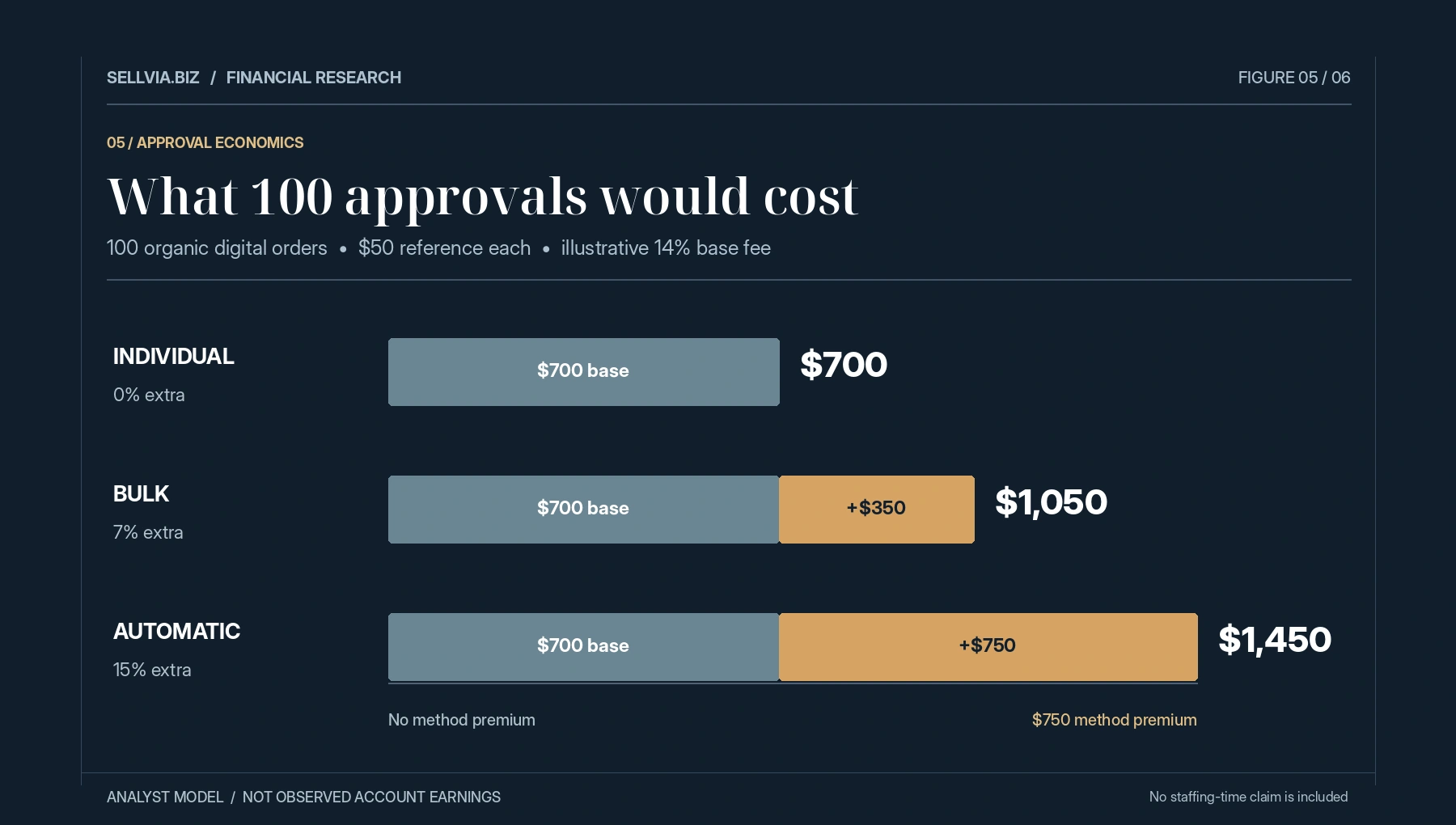
Assume 100 qualifying organic digital orders, each with a $50 Catalog Retail Price. Use a hypothetical Order Service Fee of 14% of that reference price, or $7 per order. The published range is 10%-18%; the precise rate must be checked in the relevant account. The underlying service-fee total for 100 orders is therefore $700, regardless of the approval method in this controlled set.
For individual approval, no extra method surcharge applies. The direct modeled order charges total $700. For bulk approval, the 7% addition is $3.50 per $50 order, or $350 across 100 orders, bringing the total to $1,050. For automatic approval, the 15% addition is $7.50 per order, or $750 across 100, bringing the direct total to $1,450. These are three mutually exclusive route scenarios, not a recommendation to apply both bulk and automatic surcharges to the same order.
| Approval method | Base fee per order | Additional method fee | Total per order | Total for 100 |
|---|---|---|---|---|
| Individual | $7.00 | $0.00 | $7.00 | $700 |
| Bulk | $7.00 | $3.50 | $10.50 | $1,050 |
| Automatic | $7.00 | $7.50 | $14.50 | $1,450 |
These percentages are applied to Catalog Retail Price, not to the partner’s commission. That detail is easy to miss. If commission happens to be $20 on a $50 order, the automatic surcharge remains $7.50 in this model; it does not become 15% of $20. The percentage base must be preserved in every spreadsheet formula.
Add the operator’s time, but do not invent it
The previous chart compares platform charges only. It does not tell us what happens if approving orders consumes a meaningful amount of staff attention. We therefore added an explicitly hypothetical workload test. Assume that an individually approved order takes five minutes of operator work, a bulk-approved order uses two minutes of average attention once batching and checks are included, and an automatically approved order requires twelve seconds of periodic oversight on average. Those figures are not measured Sellvia performance. They are placeholders to show how an owner can perform their own calculation.
At 100 orders, the model produces 500 minutes of manual work (8.33 hours), 200 minutes for bulk (3.33 hours) and 20 minutes for automatic oversight (0.33 hours). If management values that time at $25 per hour, the modeled labor costs are approximately $208.33, $83.33 and $8.33. The combined direct charges plus time cost become $908.33 for individual, $1,133.33 for bulk and $1,458.33 for automatic approval. Under those assumptions, individual approval still has the lowest all-in modeled expense.
The numbers illustrate why a fee-versus-convenience argument needs both sides. Speed has financial value, but a 15% surcharge on reference price can be expensive relative to a few minutes of attention for a modest-priced order. A business should replace our time assumptions with observed average minutes per order and a realistic hourly cost or opportunity value. If the operator is a founder who cannot hire staff, the shadow cost may involve missed sales work rather than wages.
The break-even time calculation
Here is the simple threshold that makes the decision measurable. On a $50 reference-value order, bulk approval adds $3.50 compared with individual approval. At a $25 hourly time value, bulk must save at least 8.4 minutes of effective work per order to cover that extra fee purely through labor savings: $3.50 / $25 times 60 minutes. Automatic approval adds $7.50, so it needs to save 18 minutes per order relative to individual approval on that same narrow financial basis.
If individual approval actually takes only three minutes, the time-only case for either surcharge is weaker at that wage assumption. If a backlog causes orders to expire, prevents other work, or creates avoidable late-approval penalties, the calculation changes because avoided exceptions also have value. These operational costs should be estimated from real business evidence, not casually added until the preferred method wins.
For a higher-price digital course with a hypothetical $100 reference price, the method surcharges double to $7 bulk and $15 automatic. The labor thresholds double as well at a fixed wage value. The extra fee is linked to reference price, not to how long the click takes. That creates an important asymmetry: order approval effort may remain similar while the percentage-based charge rises with price.
A three-part operational checklist
Before changing the approval mode, we would review a live order queue in three passes. The first is classification: record Promoted versus Organic, item reference prices, and underlying charges so no distinct fee architecture is accidentally mixed. The second is capacity: how many orders need attention each day, how long each approval actually takes, and whether the operator can reliably clear the queue. The third is funding: whether the card or Order Processing Credits available for eligible charges can support the chosen workflow when approvals happen.
The last point is easy to overlook. The current terms describe automatic approval using sufficient Order Processing Credits. A setting that exists in the dashboard does not mean the account always has enough credit capacity to pay required charges. Likewise, bought credits are prepaid non-cash service units with their own restrictions; the face value of unused credits should not be treated as money already recovered from the business. A well-run queue checks the funding source separately from the commission expected from orders.
It is also useful to keep two timestamps: when the order was created and when it was approved. That allows a manager to track the age of unresolved orders rather than noticing a problem only after an exception appears. Attributing a delay to the approval mode without measuring the queue is guesswork. Attribution and timestamps make it a solvable operational issue.
When bulk approval is a rational middle ground
Bulk approval is sometimes described as “the cheap version of automation.” We would not use that label without qualification. The published 7% is a real additional surcharge on each included order, even when 20 orders are approved in one operation. It does not mean the whole batch pays one flat 7% fee. The operational benefit is the ability to handle several orders together, which may reduce repetitive administration or speed up a backlog.
Suppose a small team checks orders twice daily. Individual approval remains manageable on quiet days, but on a promotional peak the queue grows quickly. A bulk operation could lower the chance of missing an item in the backlog. The decision should be made from the actual number of clicks saved, the handling time, and the impact of delayed approval. A flat recommendation to always batch 100 orders would ignore the fact that 100 orders may arrive over many days, with no operational reason to hold them for a single batch.
There is also a minimum definition to respect: the current terms describe bulk approval as two or more orders approved simultaneously in one operation. An individual order cannot become a discounted “bulk” case by naming it that way in a spreadsheet. The record should use the actual method and any applied surcharge.
What automatic approval really purchases
Automatic approval buys convenience, workflow continuity and reduced dependency on manual action, subject to the account’s eligibility and credits. Its 15% additional fee is a visible trade-off rather than a hidden defect. In a very high-volume operation, avoiding continual human approval might be valuable. In a low-volume operation where the owner checks the dashboard once or twice a day, the same surcharge might be harder to justify from time savings alone.
Our editorial test treats automatic approval like a service that must pass a value test: avoided labor, avoided exceptions, improved consistency and the opportunity to spend time on productive tasks, minus the added fee. We deliberately do not attach speculative conversion lifts or customer-satisfaction percentages. Such claims would need actual before-and-after evidence from an operating account and a method that controls for differences in demand.
Automatic approval also does not remove the need for oversight. A sound workflow still verifies balances, actual charges, order statuses and exceptions. Spending less time clicking “approve” is not the same as spending zero time running the business. A monthly review should check whether the automation generated the expected benefit and whether the queue remained healthy.
The late-approval edge case should be in every risk plan
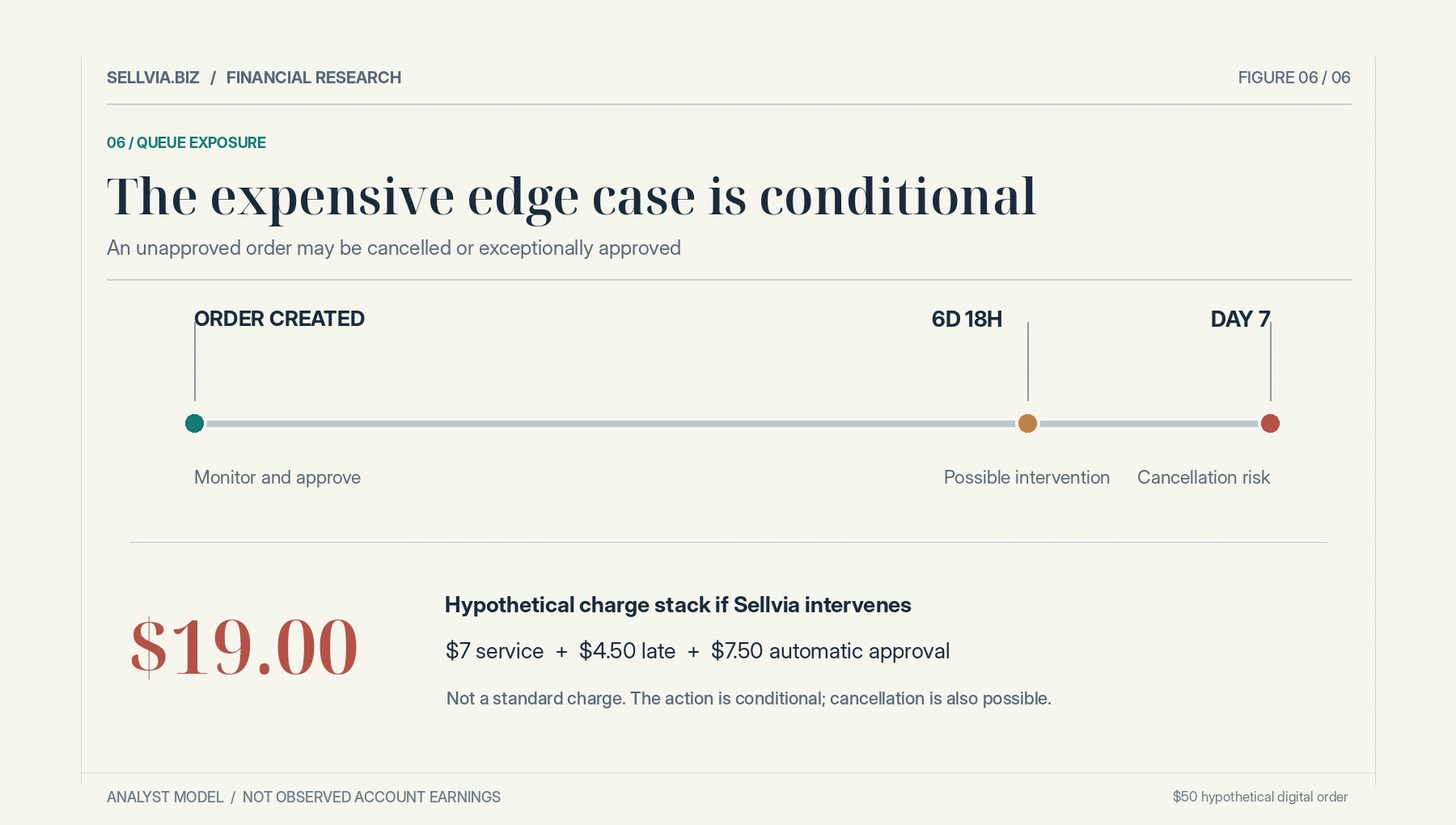
The current Terms describe potential cancellation of orders unapproved within seven days. They also describe a specific near-deadline intervention: Sellvia may use the customer’s Available Commission to approve an order and apply a 9% Late Approval Fee plus the 15% Automatic Approval Fee, alongside other applicable charges. The 9% and 15% are not the ordinary cost of individual approval; they arise in the specified exceptional process.
For a $50 organic digital order with our illustrative $7 base service charge, that exceptional stack could involve $4.50 late fee plus $7.50 automatic fee, producing $19 in the three listed charges before any other relevant adjustment. This is a scenario calculation, not a claim that Sellvia always executes the intervention or that every unapproved order is rescued. The terms use conditional language; cancellation is also a possible outcome.
A useful operational rule is to assign a daily owner for exceptions and record the order age in hours or days. If automatic approval is not active, someone must regularly confirm that pending orders have not been forgotten. Paying a small amount for routine administration can be more efficient than allowing preventable exceptions to accumulate. The risk also reinforces why a 100-order example should be translated into a daily queue plan rather than treated as one imaginary instant batch.
The premium-product distortion
Approval surcharges scale with Catalog Retail Price. This has an unusual consequence for a digital-product catalog: a $100 video course can involve twice the method surcharge of a $50 ebook even if checking and approving the order requires approximately the same operator effort. Our editorial team therefore ran a second price-point check. At $25 reference price, bulk adds $1.75 and automatic adds $3.75. At $100, those become $7 and $15. At $200, they become $14 and $30. None of those figures is a commission estimate; they are percentage applications to reference price.
The takeaway is not that a higher-priced digital course should never be automatically approved. Rather, a single approval policy may not be economically optimal across different reference values. The owner needs a realistic way to review options by type of order, actual workflow capabilities and the fees shown in the specific account. If the platform does not permit granular method settings for an account, use the model to understand the cost of the available choice, not to assume a control exists.
Do not disguise credits as a discount
An operator might prepay Order Processing Credits and feel that a later approved order was “free” because no new card payment appeared. That interpretation confuses cash timing with economic cost. The credits were funded earlier; using them consumes a resource already purchased. In a period-level ledger, the card payment and the later credit consumption should be reconciled without double counting, but the order charge still matters for unit economics.
The current terms also distinguish Ads Credits from Order Processing Credits. Ads Credits are for promotion delivery; Order Processing Credits are for eligible order charges. The two should never be pooled in a spreadsheet as though they were interchangeable cash. Similarly, Available Commission has its own redemption rules and should not be assumed to function like a general-purpose bank balance.
This is where the platform’s defined balances help careful operators. Separate categories make it possible to monitor promotional runway, approval funding and potential commission independently. The operational challenge is maintaining that separation when orders arrive quickly and several services consume credits during the same week.
How we would decide in practice
We would not start by enabling the most automated option. We would begin by measuring five real variables for a representative period: order count, average Catalog Retail Price, average handling time per approval, the percentage of orders close to the approval deadline, and the actual incremental charges by method. We would calculate the cost of individual, bulk and automatic routes using those measured values. Then we would add a justified estimate of time value and any observed avoidable exception costs.
A small store with a manageable queue may find that individual approval provides the best control at the lowest surcharge. A growing store that clears groups of orders during predictable work sessions might use bulk approval where the operational benefit exceeds the 7% addition. An operator managing a larger volume with sufficient Order Processing Credits may find automatic approval worth its 15% additional fee for reliability and time saved. Those are hypotheses to test against account data, not universal rankings.
The final decision should be revisited after the order mix changes. The ideal route for ten low-priced ebook orders may not be the ideal route for 200 course orders. A process is efficient only while its cost, reliability and funding needs remain aligned with the actual business.
Frequently asked questions
Does individual approval mean there is no Sellvia order fee?
No. It means there is no additional method-of-approval surcharge. The applicable CPA or Order Service Fee and other relevant charges remain.
Are bulk and automatic approval fees charged together?
Under the current published schedule, the 7% bulk addition and 15% automatic addition are alternatives for the same normal order-approval method, not simultaneous surcharges.
Is automatic approval always worth the added cost?
No. Its value depends on actual time saved, order volume, queue risk, funding and reference prices. We recommend calculating the real cost against measured operational benefit.
What happens if orders are left unapproved?
The terms describe possible cancellation after the stated approval period and a conditional late intervention that may bring additional fees. Do not assume that every old order will be processed automatically.
Can Order Processing Credits make the underlying fee disappear?
No. Credits are a funding instrument for eligible charges, not a waiver. Record consumption as part of the order’s economics without counting the original top-up twice.
Sources and editorial disclosure
The published percentage inputs and order definitions were taken from Sellvia’s Terms of Use, including Sections 1.3, 2.6, 3.3 and 3.4. The 100-order queue, timing assumptions and labor-cost comparison are independent scenario calculations prepared for Sellvia.biz. We did not run the modeled transactions in a live account. For broader context, our financial risks review and cash-flow explainer discuss why operational charges and available cash should be tracked separately. Before approving actual orders, confirm the applicable account terms and final transaction preview.

Freya Morgan is an ecommerce content writer and platform researcher at Sellvia.biz. She focuses on Sellvia’s digital selling tools, subscription plans, advertising features, store management, and financial workflows. Freya aims to make complex platform information easier to understand by presenting clear explanations, practical examples, and balanced analysis. Her articles help beginners evaluate costs, understand how Sellvia operates, and choose an approach that fits their online business goals.