
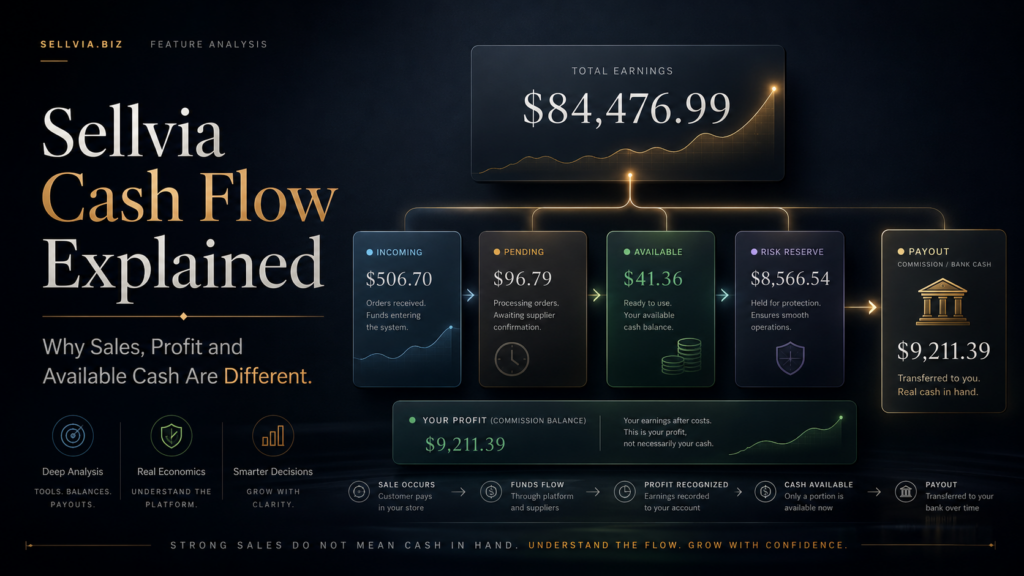
A practical reconciliation of Total Earnings, “Your profit,” Pending, Incoming, Available, Risk Reserve and the amount that finally reaches a bank account.
A Sellvia dashboard can display $1,000 in Total Earnings, a positive profit figure beside processed orders and much less than $100 in Available balance without any of those figures being mathematically inconsistent. The numbers look as if they should match because they all relate to the same customers. In practice, each one answers a different question.
That distinction matters more than it first appears. A sales figure answers, “How much did customers pay?” An order-profit figure answers, “What expected earnings are attached to this order after the processing costs shown for it?” A monthly operating result answers, “Did those earnings cover advertising and recurring expenses?” Available asks, “How much has cleared the platform’s timing and reserve rules?” A bank statement answers the final question: “How much cash has actually settled outside the platform?”
When I first mapped these figures in a reconciliation sheet, the useful breakthrough was to stop searching for one master number. There is no single Sellvia metric that simultaneously measures demand, margin, liquidity and bank cash. The dashboard becomes easier to understand once those four jobs are separated.
The Complete Sellvia Money Ladder
The cleanest model is a ladder rather than a single balance:
Movement along this ladder is not instantaneous. An order can appear in sales before it is processed. A processed order can create expected earnings before those earnings are Available. Available funds can still be below a method-specific payout minimum. A submitted payout can remain outside the bank until it finishes settlement.

What Every Financial Metric Actually Measures
| Metric | Primary question answered | What it does not prove | Usable for orders? | Withdrawable? |
|---|---|---|---|---|
| Total Earnings / sales | How much retail revenue customers generated. | It does not prove profit, Available cash or a completed payout. | No. | No. |
| Your profit | Expected order earnings after the total processing costs shown for that order. | It does not include every period expense, especially advertising and subscription costs. | Not while Pending or Incoming. | Not by itself. |
| Operating profit | Whether earnings for a period exceed advertising, subscription and other non-order expenses. | It does not show when cash will clear. | Not a dashboard balance. | Not a dashboard balance. |
| Pending | How much is associated with orders that still need processing. | It does not prove the order has completed the required workflow. | No. | No. |
| Incoming | How much entered the mandatory three-calendar-day hold after processing. | It is not yet Available. | No. | No. |
| Available | How much has cleared the short hold and can be used through permitted options. | It is not automatically cash in a bank. | Not directly; it may be converted to Processing Credits for a fee. | Yes, subject to method requirements. |
| Risk Reserve | How much of the released earnings remains held against refunds, disputes and chargebacks. | It is not bank-withdrawable cash. In the reviewed account, certain internal transactions were labeled “Balance + Risk Reserves.” | Not directly; eligibility for specific internal charges depends on the live transaction screen. | No, until released. |
| Payouts | How much has been withdrawn through the payout workflow. | A newly requested payout may not yet have settled. | No. | Already in the withdrawal process. |
| Bank cash | How much actually arrived in an external account after fees and settlement. | It says nothing by itself about remaining Available or Reserve balances. | It can fund manual processing by card. | Already outside the platform. |
An important terminology caution
Sellvia’s Help Center uses several closely related phrases: Total Earnings, customer payments, Commission balance, Your profit and earnings. The Orders guide defines “Your profit” as the customer price minus the total processing costs shown for the order. The Balance guide describes Commission balance as actual profit, while also describing how a sale moves through the four balance stages. Those descriptions are useful, but they are not a substitute for the exact transaction lines in a particular account.
Sales, Order Profit and Operating Profit
Sales are a demand measure
Sales are useful for measuring demand, average order value and order volume. They are not a reliable shortcut to profit. A store can create substantial sales while spending even more on advertising, or while a large share of its orders remains unprocessed. Total Earnings can also cover a broader time window than the expenses being compared with it, which is another common source of false conclusions.
“Your profit” is an order measure
The current Orders guide says the dashboard’s Your profit figure is the difference between the amount paid by the customer and the total processing costs. Its example combines product cost, processing fee and service fee. That is more precise than describing the figure as “sales minus one processing percentage.” It also means the processing cost should not automatically be subtracted again when calculating margin from the displayed Your profit number.

The processing payment still matters for cash flow. Manual orders require a card payment before the related earnings complete the balance cycle. Economically, the dashboard may already reflect the order cost in Your profit; operationally, the owner still has to provide liquidity at the time of processing. That is why processing capital belongs in a cash ledger even when it should not be deducted twice from the profit-and-loss calculation.
Operating profit is a period measure
This calculation should use the same date range for both earnings and expenses. It should also distinguish between advertising budget consumed and an Ads Credits transfer. Moving $100 into an advertising balance is a cash-allocation event; the actual advertising expense is the amount consumed by campaigns during the period.
Sellvia.biz already covers contribution margin, CAC and monthly break-even in the separate Sellvia Break-Even Analysis. The narrower point here is timing: even a correctly calculated positive operating result can coexist with a low Available balance or a lower bank balance.
How Pending, Incoming, Available and Risk Reserve Work
Pending begins before processing
When a customer places an order, the associated amount appears in Pending. It stays there until the order is processed. Pending is therefore evidence of an order, not evidence of completed cash availability. Sellvia documents a seven-day deadline: an order left unprocessed is eventually canceled and the customer is refunded.
Orders are normally processed either manually with a bank card or automatically through Order Processing Credits. The platform also documents one special automatic attempt to use Available balance shortly before the seven-day cancellation. That exception should not be confused with the normal rule: Commission balance, including Available, cannot ordinarily pay for order processing directly.

Incoming begins after processing
After successful processing, the relevant earnings enter Incoming and remain there for a mandatory 72-hour hold. The official guide specifies calendar days, so weekends count. Incoming should therefore be read as “processed but still held,” not “available in about three more business days.”
The release is split 75/25
After the three-day hold, the documented allocation is:
Available is the Commission balance category eligible for bank withdrawal and the standard balance-conversion options described in the Help Center. The remaining quarter goes to Risk Reserve for 125 days. Sellvia describes the reserve as temporary protection against potential chargebacks, disputes and refunds. It is not presented as a permanent fee; the held amount moves to Available automatically after the reserve period, subject to account adjustments. The reviewed transaction history also shows that certain eligible internal purchases can be recorded with “Balance + Risk Reserves” as the payment method. That internal use does not make Risk Reserve bank-withdrawable.
This produces a predictable gap. If $400 of verified earnings completes the Incoming hold, approximately $300 moves to Available and $100 enters Risk Reserve. A user looking only at the total Commission balance may see the entire $400 in the cycle, while the payout screen can use only the $300 released share.
Available has three documented uses
- Bank payout: subject to the selected method’s minimum, fee, verification and account-status requirements.
- Transfer to Order Processing Credits: a 28% service fee applies. Sellvia’s example says obtaining $100 in Processing Credits costs $128.
- Transfer to Ads Credits: a 5% transfer fee applies.
These choices are not economically identical. A bank payout increases external liquidity. A Processing Credits transfer keeps funds inside the operating system and pays for automation. An Ads Credits transfer allocates money to promotion. The same $100 of Available balance can therefore have a different practical value depending on where it goes.

When Available Becomes Bank Cash
Available is the start of payout eligibility, not the end of the cash cycle. Sellvia currently lists four conditions for a bank withdrawal:
- The Available balance must meet the minimum for the selected method.
- The Sellvia subscription must be active and paid.
- The phone number must be verified.
- Identity verification must be completed.
Bank withdrawals are unavailable during the free trial. During that period, the current guide says only transfers to Ads Credits or Processing Credits are available. For a first bank withdrawal, Sellvia uses Veriff for KYC and charges a one-time $4.99 verification fee. The guide says this is charged from Available balance and may also use Risk Reserve when Available is insufficient.
| Current documented method | Fee | Typical timing | Important minimum |
|---|---|---|---|
| US Bank Transfer | 5% + $10 | 5–7 business days | $200 documented for this method |
| Express Bank Transfer | 14% | About 1 business day | Confirm in the payout screen |
| International Wire Transfer | 7% | 5–8 business days | Confirm in the payout screen |
| Express International Transfer | 14% | 1–3 business days | Confirm in the payout screen |
| Ads Credits | 5% | Instant balance conversion | Not a bank withdrawal |
| Processing Credits | 28% | Instant balance conversion | Not a bank withdrawal |
The separate official Fees page describes ACH as 5% with a $10 minimum fee, while the Balance and Payouts page describes US Bank Transfer as 5% plus $10. Because those formulations are not identical, the fee displayed on the final payout confirmation screen should be treated as authoritative for the individual request.
One Illustrative Sale, Reconciled Without a Fake Payout
Assume a customer pays $59 for a digital offer. The order screen shows total processing costs of $21 and expected Your profit of $38. The owner processes the order manually using a card. For this example, the transaction history then records $38 as the earnings entering the balance cycle.
| Step | Amount | What the amount means | Usable now? |
|---|---|---|---|
| Customer total | $59.00 | Gross retail sale shown in the Orders area. | No. |
| Total processing costs shown | $21.00 | Illustrative combined order costs from the receipt. | Paid during processing. |
| Your profit | $38.00 | Expected order earnings: $59 minus $21. | Not until the balance cycle advances. |
| Pending | $38.00 | Earnings associated with the order before processing completes. | No. |
| Incoming | $38.00 | Processed earnings during the 72-hour calendar-day hold. | No. |
| Available after hold | $28.50 | 75% of the $38 earnings amount. | Eligible for permitted uses, but too low for a bank payout. |
| Risk Reserve | $9.50 | 25% held for 125 days. | No. |
The important correction is that this single order does not produce an immediate bank payout. Its $28.50 Available share is below the general $100 threshold and far below the documented $200 minimum for a US Bank Transfer. Any example that subtracts an ACH fee from $28.50 and calls the result a bank deposit is operationally impossible.
A separate, valid payout example
Suppose the store has accumulated exactly $250 in Available balance across multiple cleared orders and chooses US Bank Transfer. Using the current Balance and Payouts formulation:
The request clears the documented $200 method minimum. The estimated settlement period is 5–7 business days. The payout still requires an active subscription, phone verification and KYC. The example is mathematically valid, but the live payout screen should still be checked because Sellvia’s Fees article describes the $10 component differently.
A Consistent 30-Day Liquidity Ledger
The next illustration tracks timing instead of pretending that weekly totals automatically explain cash. It assumes:
- Opening external bank cash: $2,500.
- Six order batches with $2,700 total verified dashboard earnings after the order-level costs shown by the platform.
- Manual processing payments totaling $900, tracked as liquidity outflows rather than subtracted a second time from displayed order earnings.
- Advertising consumed: $900.
- Monthly subscription: $39.
- No refunds, chargebacks, balance transfers or performance-tier charges.
- A $1,000 US Bank Transfer requested on day 25 and settled on day 30 with a $60 fee under the 5% + $10 formulation.
| Date | Event | External bank movement | Available movement | Risk Reserve movement | Closing Available |
|---|---|---|---|---|---|
| Day 1 | 10 orders processed; $300 earnings enter Incoming; subscription paid. | −$100 processing −$39 subscription | $0 | $0 | $0 |
| Day 4 | First batch completes 72-hour hold. | $0 | +$225 | +$75 | $225 |
| Day 6 | 12 orders processed; $360 enters Incoming. | −$120 processing | $0 | $0 | $225 |
| Day 9 | Second batch released. | $0 | +$270 | +$90 | $495 |
| Day 11 | 15 orders processed; $450 enters Incoming. | −$150 processing | $0 | $0 | $495 |
| Day 14 | Third batch released. | $0 | +$337.50 | +$112.50 | $832.50 |
| Day 16 | 18 orders processed; $540 enters Incoming. | −$180 processing | $0 | $0 | $832.50 |
| Day 19 | Fourth batch released. | $0 | +$405 | +$135 | $1,237.50 |
| Day 21 | 20 orders processed; $600 enters Incoming. | −$200 processing | $0 | $0 | $1,237.50 |
| Day 24 | Fifth batch released. | $0 | +$450 | +$150 | $1,687.50 |
| Day 25 | KYC fee charged; $1,000 payout requested. | $0 | −$4.99 KYC −$1,000 payout | $0 | $682.51 |
| Day 26 | 15 orders processed; $450 enters Incoming. | −$150 processing | $0 | $0 | $682.51 |
| Day 29 | Sixth batch released. | $0 | +$337.50 | +$112.50 | $1,020.01 |
| Day 30 | US Bank Transfer settles; $900 of ads was paid across the month. | +$940 payout | $0 | $0 | $1,020.01 |
The two closing reconciliations
The store’s bank cash ended $899 below its opening balance even though the dashboard earnings for the period were $2,700. Using the documented Your profit basis, an illustrative operating result before payout and verification fees is:
The difference is timing and location. At month-end, another $1,020.01 remained Available, $675 remained in Risk Reserve, and a substantial amount of external cash had been used before the payout settled. This does not prove that every real account will follow the same pattern. It demonstrates how a positive period result can coexist with lower unrestricted bank cash.
Why Sales Can Rise While Available Stays Flat
When the sales chart rises faster than Available, check the following causes before assuming the dashboard is wrong:
- New orders are still Pending because they have not been processed.
- Processed earnings are still within the 72-hour Incoming hold.
- One quarter of released earnings has moved to the 125-day Risk Reserve.
- Available was converted to Processing Credits and reduced by the 28% transfer fee.
- Available was converted to Ads Credits and reduced by the 5% transfer fee.
- A subscription, KYC charge, payout or documented account adjustment reduced Available.
- The payout request has left the balance but has not yet settled in the bank.
- The selected reporting date range excludes expenses or releases included elsewhere.
- A refund, dispute or chargeback adjusted earnings previously visible in the cycle.
- Each store has its own separate balance, so another store’s Available amount cannot be combined.
Most gaps become understandable after the transaction dates are aligned. An unexplained discrepancy should still be documented with order IDs, balance history, payout status and dated screenshots before contacting support.
Working Capital in the Sellvia Operating Cycle
Working capital here is not an abstract accounting ratio. It is the money needed to keep processing orders and paying for traffic while earlier earnings remain Pending, Incoming or reserved.
This is a planning model, not an official Sellvia formula. The buffer should be increased for uneven order volume, advertising renewals, card authorization delays, refunds, weekend operations and the fact that 25% of released earnings remains unavailable for much longer than three days.
| Operating pattern | Daily processed orders | Average processing payment | Short-cycle days | Core buffer | Practical planning note |
|---|---|---|---|---|---|
| Small test | 3 | $10 | 3 | $90 | Add enough room for ads and one delayed card charge. |
| Steady operation | 10 | $12 | 3 | $360 | A 20–30% safety margin reduces interruption risk. |
| Fast scale-up | 20 | $14 | 3 | $840 | Plan separately for the quarter held in Risk Reserve. |
| Longer clearing assumption | 10 | $12 | 5 | $600 | Useful when internal timing, weekends or account checks create uncertainty. |
Card processing versus Processing Credits
Manual processing uses a bank card and avoids the 28% top-up fee for Processing Credits, but it requires the owner to act on each order. Processing Credits automate the workflow but cost more to fund. The right choice is therefore not simply “which is cheaper?” It depends on order volume, response time, the probability of missed orders and the value of automation.
For a broader explanation of the dashboard tools, see Sellvia Tools Explained. For the underlying subscription and fee structure, see Sellvia Pricing Explained. The complete operating sequence is covered in How Does Sellvia Work?.
Three Problems That Need Different Solutions
1. Sales without operating profit
Orders are arriving, but customer acquisition and recurring expenses exceed verified order earnings. This is an economics problem. Adding more processing capital will not repair negative unit economics. The remedy is to reduce acquisition cost, improve conversion, improve the offer mix or stop scaling the weak campaign.
2. Profit without immediate liquidity
Verified order earnings exceed advertising and subscription costs, but most money remains Incoming or Risk Reserve. This is primarily a timing problem. The response is to maintain an appropriate processing buffer, avoid scaling faster than the cash cycle can support and monitor release dates.
3. Available balance without unrestricted bank cash
The funds have cleared into Available, but they may be below the selected method minimum, waiting for KYC, allocated to credits, deducted by a payout request or still settling. This is a conversion and settlement problem. It requires checking the payout screen rather than recalculating sales.
“I Have Sales but No Available Cash”: A 10-Minute Check
- Set one exact reporting period in Orders and Reports.
- Record gross customer sales for that period.
- Separate orders placed from orders actually processed.
- Record Your profit and total processing costs from the same orders.
- Check how much remains Pending.
- Check how much is Incoming and the processing dates behind it.
- Record Available and Risk Reserve separately.
- Check transfers to Processing Credits and Ads Credits.
- Check subscription, KYC, payout and adjustment transactions.
- Confirm whether a payout is requested, approved or settled.
- Compare the payout method minimum with the current Available balance.
- Document any remaining difference by order ID and transaction date.
When that equation works, the difference between sales and Available is usually timing or allocation rather than missing money. When it does not work, a dated reconciliation gives support a precise problem to investigate.
Frequently Asked Questions
Are Sellvia sales the same as profit?
No. Sales show the retail value paid by customers. The Orders section separately displays Your profit, defined by Sellvia as the customer price minus the total processing costs shown for the order. A complete operating result must also include advertising, subscription and other period expenses.
Is the profit shown for an order final business profit?
Not necessarily. It is an order-level earnings figure. It does not automatically account for customer acquisition cost, the monthly subscription, optional services, payout fees, verification charges or every business expense outside the dashboard.
Why is my Available balance much lower than Total Earnings?
Total Earnings is gross sales. Available contains only the released portion of eligible earnings after orders have been processed and the 72-hour hold has completed. The other 25% remains in Risk Reserve for 125 days.
Can Pending commission be used to process orders?
No. Pending represents orders that have not completed processing. Normal processing requires a bank card or Order Processing Credits. Unprocessed orders can be canceled after seven days.
Can Incoming funds be withdrawn?
No. Incoming is the mandatory three-calendar-day hold after processing. The documented release occurs automatically, with 75% moving to Available and 25% moving to Risk Reserve.
Can Available commission process an order?
Not directly under the normal workflow. Available can be transferred to Order Processing Credits for a 28% fee. Sellvia separately documents one automatic attempt to use Available balance before an unprocessed order reaches the seven-day cancellation point.
Why do I still need my own money after making sales?
Because processing has to happen before the related earnings become Available. A card or pre-funded Processing Credits bridges that gap. This is a liquidity requirement even when the order-level margin is positive.
Is Available the same as money in my bank?
No. Available still has to meet the selected payout method’s minimum, pass account verification requirements and complete payout settlement. A request can reduce Available before the net deposit appears in the bank.
What is required for a first bank payout?
The current guide requires enough Available balance, an active paid subscription, a verified phone number and completed KYC. Bank withdrawals are unavailable during the trial. The one-time identity-verification fee is currently listed as $4.99.
How much working capital should I keep?
Start with expected daily processed orders multiplied by average processing payment and the number of days before earlier earnings become usable. Then add a safety margin for advertising charges, order spikes, refunds and longer clearing assumptions.
33 responses to “Sellvia Cash Flow Explained”
-
The five-number framework at the end – Total Earnings, order profit, operating profit, Available, bank cash – is the thing I needed in week one. I was treating Total Earnings as my profit for three weeks and wondering why my bank account didn’t agree with my dashboard.
-
Same mistake at exactly the same stage. The dashboard looked great. My bank looked confused. It took me until day 34 to understand that those two numbers answer completely different questions and will almost never match in real time.
-
-
The fact that this distinction requires a 3000-word article to explain suggests the platform UX could do more work. If “Total Earnings” routinely misleads beginners into thinking it’s spendable money, renaming it “Total Customer Sales” would save a lot of confusion without changing anything technical.
-
That’s actually a fair UX critique. Though in fairness the dashboard does show Available separately and clearly – the problem is users leading with the biggest number they see rather than reading what each field actually means. Both things can be true.
-
-
The 30-day ledger table is the most useful thing in any Sellvia review I’ve ever read. Running my own version of that table in a spreadsheet in month two changed how I made every subsequent decision. Seeing processing payments as liquidity outflows rather than P&L deductions finally made the bank reconciliation make sense.
-
Did you build that spreadsheet from scratch or adapt the one in this article? I’ve been meaning to do this but haven’t found a clean starting template.
-
Built from scratch using the column structure in this article as a guide. Five columns – date, event, bank movement, Available movement, closing Available. Takes about 10 minutes per week to update and it’s the single most useful thing I do for the business.
-
That’s exactly the kind of specific answer I needed. Setting that up this weekend. The closing bank cash reconciliation at the end of the example – $1,601 vs $2,700 in earnings – is the visual I needed to understand why my bank never matched my dashboard in month one.
-
-
The 28% fee to convert Available to Processing Credits is the number that genuinely surprised me here. I knew the fee existed but seeing it named explicitly next to the 5% bank transfer fee makes the choice between manual processing and automation a real economic decision, not just a convenience decision.
-
This is the calculation I wish I’d run before month one. At low order volume manual processing is obviously cheaper. The break-even point where automation saves you more in missed-order risk than the 28% costs is the question nobody in the community seems to have answered with actual numbers.
-
My rough math – if you’re missing more than 1 in 4 orders due to manual processing delays, the 28% starts to look rational. Below that threshold, card processing wins on economics alone. Every Sellvia review focuses on the fee without doing that comparison, which makes the decision seem simpler than it is.
-
-
-
The “three problems, three solutions” framework near the end is the clearest I’ve seen this organized. Sales without profit is economics. Profit without liquidity is timing. Available without bank cash is conversion. Each one has a different cause and a different fix – treating them as the same problem is why beginners make the wrong move at the wrong moment.
-
Month five here and I still use this exact framework when something looks off. When my Available was flat for two weeks last month I went through the checklist – turned out I’d converted $400 to Processing Credits and forgotten about it. The 5% Ads Credits transfer I remembered. The 28% Processing Credits conversion I apparently did not.
-
The transaction history check in the 10-minute walkthrough is exactly what catches those. I now do a weekly audit of balance movements specifically looking for credit conversions I might have approved without fully registering the fee. Takes three minutes and has saved me from two confused reconciliations.
-
-
-
Six months in. This article describes exactly the cash flow reality I experienced, including the month where operating profit was positive but bank cash dropped because of timing. The sentence that stayed with me: “Profit answers whether the activity created economic value. Liquidity answers whether enough usable money is in the right place on the right date.” Those are two different questions and confusing them costs you money.
-
My Growth Manager flagged this exact ladder concept around day 143 when I kept treating “Total Earnings” like spendable cash (rookie mistake that cost me a week of confusion). The single most useful thing they said was to only watch Available balance when making payout decisions – everything else is just a different question being answered. Once I separated those four jobs the way this post describes, I stopped refreshing the dashboard every hour.
-
What I wish someone had told me before day one is that the processing cost shown on an individual order is not the same as what reduces your Available balance – those are two separate deductions at two separate points in the ladder, and confusing them had me miscalculating my actual liquidity for the first three weeks straight.
-
The hidden cost nobody prepared me for was time – specifically the 3 weeks I spent at week 7 trying to reconcile four different numbers that all looked like they should match but answered completely different questions. Once I separated what the setup measures as demand versus what it actually releases as available cash, the confusion disappeared and the ladder logic in this breakdown is exactly how I now explain it to my own spreadsheet.
-
I thought the Available balance discrepancy meant something was broken – it wasn’t, it just meant I was reading four different answers to four different questions from one screen. Around day 30 I built a small reconciliation sheet and the ladder model this post describes is exactly what I landed on independently.
-
[…] For a detailed explanation of how earnings move toward withdrawal, see our Sellvia cash flow guide. […]
-
[…] For a full explanation of these stages, see the Sellvia cash flow guide. […]
-
Brandon’s point about the Growth Manager leading with Available balance landed for me too – tbh that single framing cleared up weeks of confusion about why my earnings number and my actual usable balance weren’t the same thing. The digital product catalog on Sellvia meant the margin was already sitting in the 50-70% range, so the gap between “earned” and “available” was the only number worth watching. Once I accepted that, the dashboard stopped feeling like a puzzle.
-
-
The “ladder” framing finally clicked for me when a $67 order processed overnight and showed in earnings before I had even opened my laptop – well, not exactly “available” yet, but the service moved it without me touching anything.
-
The “ladder” breakdown finally clicked for me when I stopped treating Available balance like a running total and just accepted that $47 cleared means $47 cleared – nothing else on this platform’s dashboard is that question. Tbh the obsessive tab-checking stopped the moment I understood those numbers aren’t racing to match each other.
-
The “ad dependency” ladder rung hit me – after the service’s SEO package started pulling organic traffic, my ad spend dropped enough that the $40 I was burning weekly elsewhere became the clearest cancellation I’ve made.
-
The 28% transfer fee caught me off guard too, but what surprised me more was that the ad system on what I’m using pulled enough margin to make that fee feel like a rounding error compared to the $340 I’d have left sitting there overthinking it.
-
The ladder breakdown finally explains why my Growth Manager texted me on day one specifically about Available balance – not total earnings – because that single number was the only one that actually answered “can you move money right now.”
-
The hidden cost nobody warned me about was the mental overhead of tracking which number actually meant what – well, not exactly mental overhead, more like the hour I lost cross-referencing sales against available balance before I understood they were answering completely different questions. Once I mapped the ladder the way this post describes, the $100 withdrawal minimum stopped feeling like a wall and started feeling like a reasonable checkpoint in a system that actually has logic to it.
-
The ladder framing here is accurate, and the part that almost made me cancel was exactly this gap – I saw strong sales figures, a positive margin on processed orders, and an Available balance still below the $100 withdrawal threshold, and I assumed something was broken rather than recognizing that each number answers a completely different question.
-
My Growth Manager actually walked me through exactly this kind of reconciliation – the key distinction they flagged was that manual processing payments sitting as liquidity outflows don’t touch the order-level profit figure the dashboard already netted out, so stacking them looks messier than it is. Once I mapped that separation in my own tracking (spent an embarrassing amount of time on a spreadsheet before it clicked), the available balance math finally made sense against what the setup was actually showing me.
-
The $40 ad coupon went faster than I expected – ngl it was mostly gone before I’d even figured out what I was looking at in the dashboard. Took me a solid month before I stopped second-guessing whether the spend was actually doing anything and just let it run.
-
[…] temporarily cash-constrained. For the broader distinction between balance stages and bank cash, see Sellvia Cash Flow Explained. For the economics of one order, use Sellvia Order […]
-
[…] distinction is central to Sellvia Cash Flow Explained and complements the shorter-horizon funding model in Sellvia Working Capital Explained. Working […]



Daniel Roberts is an ecommerce writer and digital business researcher at Sellvia.biz. He specializes in exploring Sellvia’s tools, pricing, advertising features, order management processes, and overall platform structure. Through clear and practical articles, Daniel helps beginners understand how the platform works, estimate potential operating costs, compare available options, and make informed decisions when building an online business.
Leave a Reply