
Independent guide. Not affiliated with Sellvia. Figures below reflect the platform’s stated structure at the time of writing and should be verified directly inside the current Sellvia dashboard, since pricing, tiers, and balance rules can change.
Quick Answer: Sellvia is a SaaS platform that gives beginners a ready-made online store, a catalog of digital products, and a built-in advertising system. New users get a 14-day trial, pay $39 a month afterward, and need to plan for advertising and order-processing costs on top of the subscription before expecting real results.
Anyone searching for information on Sellvia is usually trying to answer one basic question: does this platform actually make it possible to start an online business without technical skills, and what does it really cost once the free trial ends? This guide walks through the mechanics of Sellvia step by step, from the moment a store is created to the moment a payout lands in a bank account, so a beginner can make an informed decision rather than guessing. For a broader look at related topics, our complete Sellvia information hub covers pricing, reviews, and platform basics in more depth.
What Is Sellvia?
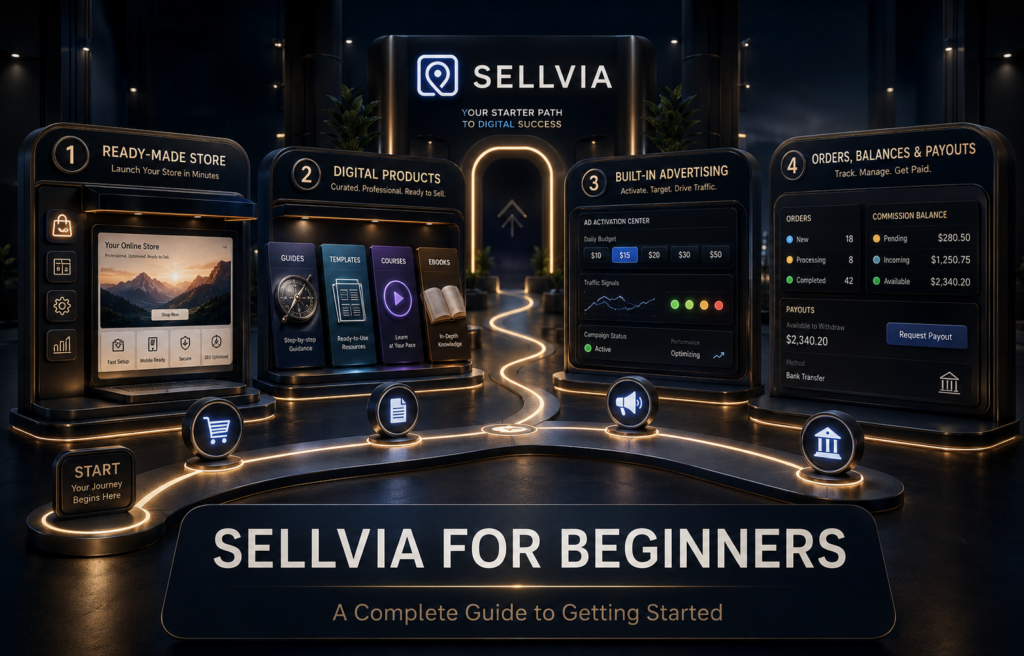
Sellvia is a SaaS platform that provides a ready-made online store, a catalog of digital products, and built-in advertising tools so beginners can run a digital-product business without building the technical infrastructure themselves. Users don’t design a website from scratch or create products on their own; instead, they get access to a functioning store environment and choose which digital products to list, then use the platform’s advertising system to bring in visitors. For a deeper breakdown of the platform itself, see what Sellvia is and how it’s positioned in the market.
The products sold through Sellvia are digital: guides, ebooks, educational courses, templates, checklists, video lessons, and similar downloadable resources. Nothing needs to be stored, packed, or handled physically, because the products are delivered electronically once a customer completes a purchase. That distinction matters, because it changes what “running the business” actually involves day to day. Instead of managing stock or deliveries, a Sellvia user manages product selection, advertising budgets, order processing, and cash flow through the platform’s balance system.
Is Sellvia Designed for Complete Beginners?
Sellvia is built around the assumption that the person signing up has never run an online business before. The store is already assembled, the products are already created, and the built-in advertising system allows beginners to launch and monitor campaigns without configuring external advertising accounts independently. That lowers the technical barrier considerably compared to building a store independently.
That said, “beginner-friendly” doesn’t mean “effort-free.” A new user still has to learn how orders move through the dashboard, how much working capital is needed to process them, and how commissions become withdrawable money over time. The learning curve shifts from technical setup toward financial literacy: understanding budgets, timing, and reporting. Beginners who are willing to spend a few weeks studying these mechanics tend to have a much clearer picture of what to expect than those who judge the platform after a few days.
What You Receive with a Sellvia Subscription
While a subscription is active, a Sellvia user has access to:
Access to these tools and resources depends on maintaining an active subscription. A beginner shouldn’t assume that every platform asset becomes permanently owned after a subscription is canceled; the practical advantage is the operating environment itself, not a transfer of static assets.
How Sellvia Works Step by Step
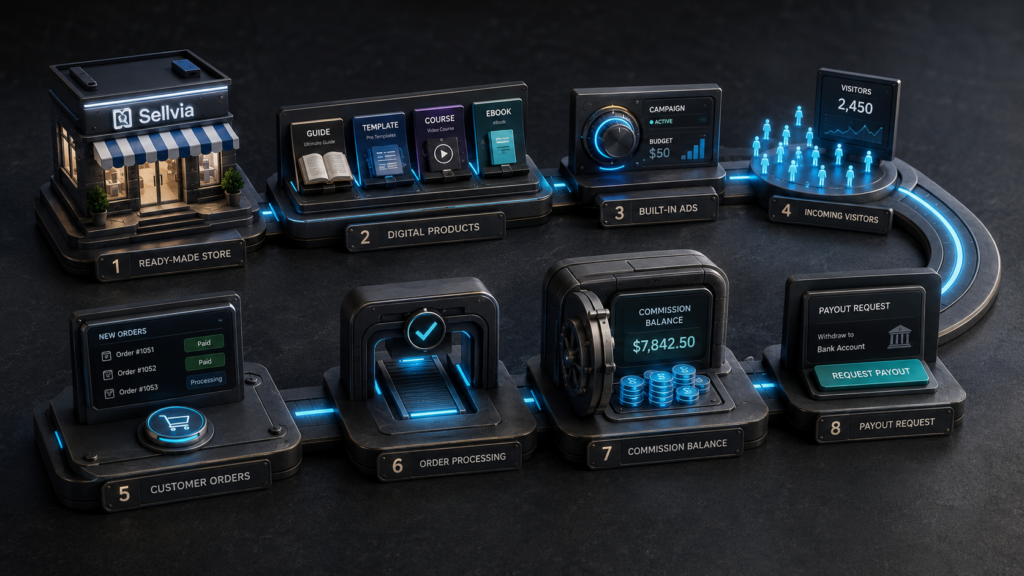
The overall workflow connects several stages into one loop: products get added to the store, advertising sends visitors to those products, visitors become customer orders, orders get processed, and processed orders generate commissions that eventually move into a withdrawable balance.
Before You Register
It helps to walk into the sign-up process with a rough sense of what’s ahead rather than deciding on the fly once the trial has already started. Before creating an account, it’s worth thinking through roughly how much could realistically be set aside for advertising and order processing beyond the $39 subscription, since the trial clock and coupon window start moving immediately. It also helps to have a payment method ready in advance, since advertising and order processing both depend on it, and to set aside time in the first few days specifically for exploring the dashboard rather than trying to learn it while campaigns are already live.
Creating and Accessing Your Store
After registration, the store is already functional, which removes the step most beginners find intimidating when starting from a blank website builder. The initial task is simply exploring the dashboard, understanding where products, orders, and reports live, and confirming account and payment settings before adding traffic.
Choosing Digital Products
The catalog contains a range of digital products, and part of the early work is selecting a focused group rather than adding items indiscriminately. A practical approach looks at whether the product solves an understandable problem, whether there’s a clear audience for it, how the commission structure compares across similar items, and whether the product fits a coherent theme for the store. Adding unrelated products without a clear angle usually makes advertising less efficient, since traffic has to work harder to find something relevant.
Activating Sellvia Ads
Once products are selected, the built-in advertising system can be activated to start sending visitors to the store. This is the step that turns a static store into an active business, since without traffic there are no orders to process.
Receiving Customer Orders
When a visitor completes a purchase, the order appears in the dashboard with an associated commission amount. At this stage, the order is not yet finished; it needs to move through processing before that commission can progress toward a withdrawable balance.
Processing Orders
Processing means paying the applicable order-processing cost so the digital product can be completed and delivered. This step is often the one beginners underestimate, because it requires funds on hand separate from the commission the order will eventually generate.
Moving Commissions Through the Balance
Once processed, a commission moves through a sequence of balance stages before it becomes available for withdrawal. Understanding this sequence is one of the most important parts of using Sellvia responsibly, and it’s covered in detail further down.
Requesting a Payout
Once enough commission has reached the Available balance and the minimum threshold is met, a payout can be requested through Sellvia Payments.
Understanding the Sellvia Dashboard
The dashboard functions as a connected system rather than a set of disconnected menus. Products lead to advertising, advertising leads to orders, orders lead to processing, processing leads to balances, and balances lead to reporting and payouts. Reading only the top-line earnings number without looking at the stages behind it tends to give a distorted picture of how the business is actually performing.
| Dashboard Section | What It Controls | What Beginners Should Monitor |
|---|---|---|
| Products | Adding and managing store listings from the catalog | Commission structure, relevance to store theme |
| Sellvia Ads | Activating and adjusting advertising campaigns | Daily spend, active budget stage, visitor volume |
| Orders | Viewing and processing customer purchases | Status of each order, processing costs owed |
| Reports | Aggregated performance data | Cost per order, completed orders, net result |
| My Store | Store settings and presentation | Overall theme consistency, product mix |
| My Account | Subscription, billing, and profile settings | Active plan, renewal dates, payment method |
| Balances | Commission stages from Pending to Available | Time in Incoming, amount in Risk Reserve |
| Payouts | Requesting withdrawals through Sellvia Payments | Minimum threshold, request status |
Products, Sellvia Ads, and Orders
These three sections form the operational core of daily activity. Products determines what’s being sold, Sellvia Ads determines who sees it, and Orders determines what needs attention to convert a sale into revenue.
Reports
Reports pull together visitor counts, advertising spend, order volume, and commission data into one place. This is the section beginners should check regularly rather than relying on a single earnings figure, since it’s the only view that connects cost to outcome.
My Store and My Account
My Store handles the presentation layer, while My Account covers subscription status and billing. Both are worth reviewing early, since billing issues or lapsed settings can interrupt advertising or order processing without much warning.
Balances and Payouts
This is where commissions actually turn into money that can leave the platform. It’s discussed in full detail below, because it’s also the section most beginners misunderstand at first.
How Much Does Sellvia Cost for a Beginner?
Sellvia’s advertised cost is a $39 monthly subscription, but the full operating cost for a beginner also includes advertising spend, potential performance-tier fees, and order-processing capital. Treating $39 as the entire budget is one of the most common early mistakes, since advertising and processing costs typically exceed the subscription fee once a store is active.
Monthly Subscription
The base subscription is $39 per month, following a 14-day free trial. During the trial, a $40 advertising coupon is typically provided to test the ad system, though this amount is unlikely to cover a full campaign on its own. The subscription may be charged automatically from available platform balance when sufficient funds are present, so it’s worth keeping an eye on billing settings in My Account.
Advertising Costs
The built-in advertising system uses staged daily budgets that increase automatically as an account progresses through its first cycle:
| Stage | Daily Budget | Typical Days Active | If Held at This Level for a Full 30 Days |
|---|---|---|---|
| Bronze | $10/day | Days 1-4 | ~$300 |
| Silver | $15/day | Days 5-9 | ~$450 |
| Gold | $20/day | Days 10-19 | ~$600 |
| Platinum | $30/day | Days 20-29 | ~$900 |
| Ultimate | $50/day | Day 30 onward | ~$1,500 |
The right-hand column shows what each daily budget would add up to only if an account stayed at that single stage for an entire month. In practice, an account moves through all five stages during its first cycle rather than staying on one level, so the actual first-month total looks different. Based on the typical day ranges above, a full first 30-day cycle works out to roughly:
That adds up to approximately $665 for the first 30 days if advertising runs daily and the account progresses through every stage on schedule. This is a planning estimate based on the stated day ranges, not a fixed or guaranteed figure, since actual timing and stage progression can vary by account and by current platform rules. Beginners should verify current stage timing and amounts directly in their account.
Performance-Tier Fees
Sellvia also applies weekly performance-tier fees tied to order volume:
- Plus: $19/week, up to 100 orders
- Advanced: $39/week, up to 250 orders
- Pro: $69/week, up to 500 orders
- Elite: $99/week, unlimited orders
Not every beginner needs the highest tier immediately; the relevant tier depends on order volume and the platform’s current rules, so it’s worth checking which tier applies as order counts grow.
Order-Processing Capital
Each customer order may require a processing payment before it can move to Completed status. This can be funded through a saved payment card or through Order Processing Credits purchased in advance. A beginner should not assume the commission tied to a specific order can always be used to pay that same order’s processing cost, since the commission may still be working its way through Pending or Incoming at the time processing is due.
Illustrative example: Suppose a store receives eight orders in a week, each with an estimated processing cost of roughly $8 and an average commission of roughly $15. The processing costs (about $64 total) may need to be paid up front, while the commissions from those same orders might not reach the Available balance for several days. If new orders keep arriving during that window, a beginner without a cash buffer can find themselves short on processing funds even though the business is technically profitable on paper. This example is illustrative only, not a guaranteed cost model.
Realistic Startup Budget Examples
| Budget Level | Subscription | Advertising (approx.) | Processing Buffer | Notes |
|---|---|---|---|---|
| Cautious testing | $39 | ~$150-200 (partial cycle, paused before Platinum/Ultimate) | ~$100-150 | Suited to a short initial test, limited order volume expected |
| Standard operating | $39 | ~$665 (full first 30-day cycle through all stages) | ~$200-300 | More realistic for evaluating a complete first month |
| 60-90 day runway | $39/month recurring | ~$1,500+ per month once at Ultimate stage | ~$400-600 ongoing | Allows time for Risk Reserve cycling and multiple advertising stages |
These are planning examples, not official figures or guaranteed-performance models. A 60 to 90 day runway is generally more informative than judging results after only a few days, since balance stages and Risk Reserve timing take weeks to fully cycle through.
How Sellvia Built-In Ads Work
The advertising system is meant to remove the need to independently learn ad-platform mechanics. A daily budget is set according to the current stage, and the system manages targeting and delivery within that budget. What a beginner should actively monitor is not just whether visitors are arriving, but the relationship between spend and outcomes: campaign status, daily spend versus visitor count, total orders generated, cost per order, and how commission volume compares to what was spent to get it.
Looking only at return on ad spend can be misleading, because gross commission is not the same as net profit. Processing costs, subscription fees, and performance-tier fees all sit between a commission and actual take-home money, so a campaign that looks strong on ROAS alone might still produce a thin or negative operating result once every cost is accounted for.
How Sellvia Orders and Processing Work
A Sellvia order moves through several statuses: New, Processing Required, Processed, and Completed. Only after processing is paid and the order moves through these stages does its commission begin progressing toward the withdrawable balance.
The important thing to internalize here is that seeing an order in the dashboard, or even seeing an attached commission figure, doesn’t mean funds are already accessible. Processing has to happen first, and processing has a real cost attached to it that needs to be funded separately from the eventual commission.
Pending, Incoming, Available, and Risk Reserve Explained
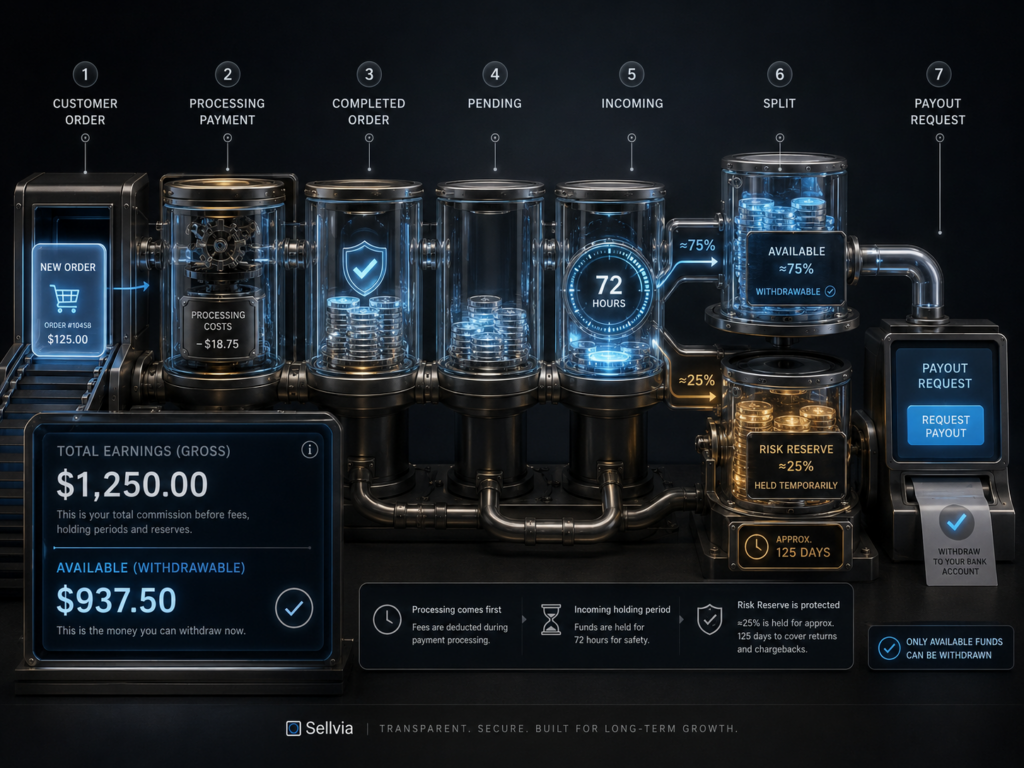
A completed Sellvia order’s commission generally moves through Pending, then Incoming for approximately 72 hours, before splitting into an Available balance and a Risk Reserve allocation, with roughly 75% typically becoming Available and roughly 25% held in reserve, subject to current account terms.
| Balance Stage | What It Represents | Can It Be Withdrawn? | Typical Next Step |
|---|---|---|---|
| Total Earnings | Cumulative activity figure across all commissions generated | No | Reference metric only, not spendable cash |
| Commission Balance | Commission tied to processed orders | No, not yet | Moves to Pending |
| Pending | Recently completed order awaiting confirmation | No | Moves to Incoming |
| Incoming | Approximately 72-hour holding window | No | Splits into Available and Risk Reserve |
| Available | Funds cleared for withdrawal | Yes | Payout request once minimum is met |
| Risk Reserve | A portion (roughly 25%) held temporarily | Not immediately | Released after a holding period, commonly cited around 125 days |
Total Earnings is a cumulative figure that reflects overall activity, not a snapshot of spendable cash or net profit; it’s easy to misread this number as available money when it isn’t. Risk Reserve funds aren’t lost, but they are restricted for a holding period before release, which is commonly cited at around 125 days, depending on current terms and account-specific conditions. Because these percentages and timeframes can be adjusted by the platform, it’s worth checking the current terms inside an active account, and reviewing our Sellvia pricing explained breakdown, rather than assuming the figures above are permanent.
How Sellvia Payouts Work
Sellvia payouts are processed through Sellvia Payments, with a minimum withdrawal amount of $100, once funds have reached the Available balance. Withdrawals are typically requested through Wire or ACH bank transfer where available, and banking timelines mean funds don’t arrive instantly even after a request is approved.
Because of the balance sequence described above, a payout request draws only from Available funds, not from Total Earnings or from money still sitting in Pending, Incoming, or Risk Reserve. Beginners planning cash flow should build in some buffer time between completing orders and actually receiving a payout, rather than assuming withdrawals happen the same day a sale occurs.
How to Calculate Your Real Operating Result
A useful way to evaluate performance is a simple operating formula rather than relying on the headline earnings number:
Net operating result = commission generated – advertising spend – order-processing costs – subscription cost – performance-tier fees – other applicable expenses
This is a practical management calculation rather than a figure necessarily displayed in exactly this form inside the dashboard, but it’s the clearest way to see whether a store is actually ahead after all costs.
As a hypothetical example: suppose a store generates $1,200 in commission over a month, spends $600 on advertising at the Gold stage, pays roughly $320 in order-processing costs across the month’s orders, covers the $39 subscription, and sits in the Advanced performance tier at $39/week (roughly $156 for the month). The rough operating result would be:
$1,200 – $600 – $320 – $39 – $156 = $85
In this hypothetical, the store is only modestly ahead once every cost is included, even though the $1,200 commission figure alone might look impressive on its own. This example is illustrative only and doesn’t represent a guaranteed or typical outcome; actual results depend heavily on advertising performance, product selection, and order volume.
A Practical 30-Day Sellvia Beginner Plan
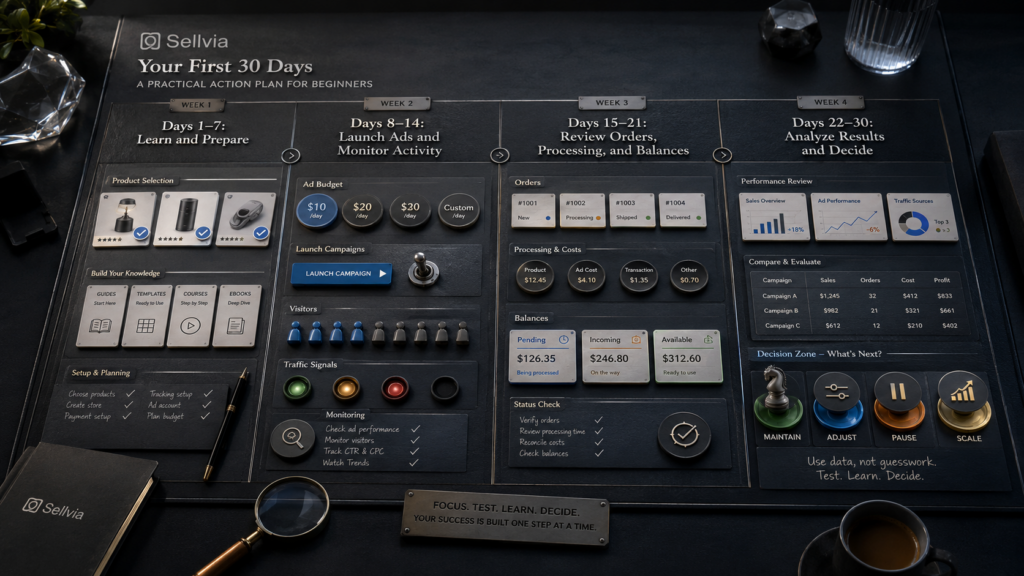
Days 1-3: Spend time in the dashboard without rushing into advertising. Review account and payment settings, browse the product catalog, and understand what processing costs will look like before any orders arrive.
Days 4-7: Narrow the store down to a focused group of related products rather than a scattered catalog. Confirm financial settings are correct and set aside an initial operating budget that includes advertising and a processing buffer, not just the subscription.
Days 8-14: Activate a controlled advertising test at the current stage. Monitor visitors and orders daily, and process orders promptly so processing costs don’t pile up unexpectedly.
Days 15-21: Start comparing cost per order against the commission each order generates. Review how many orders have moved to Completed status, and track how funds are distributed across Pending, Incoming, and Available rather than just watching the total order count.
Days 22-30: Identify which products or campaigns are performing better than others. Decide whether to maintain, pause, adjust, or scale advertising based on the net operating result rather than gross order volume, and use this data to plan the next 30 to 60 days.
Each of these stages matters because the balance and Risk Reserve timing described earlier take real time to fully cycle through; a plan that only runs for a week or two won’t capture a complete picture of how the business behaves.
Common Sellvia Beginner Mistakes
Advantages of Sellvia for Beginners
Sellvia’s clearest advantage is that it removes a large share of the technical setup that typically discourages first-time business owners: there’s no need to build a store layout from scratch, source individual products independently, or learn advertising platforms one at a time. The built-in advertising system in particular saves the time that would otherwise go into learning campaign structures independently. Centralized reporting, defined balance stages, and a structured payout process also give beginners a clearer framework for understanding where their money is at any given time, compared to piecing together several disconnected tools on their own.
Why Sellvia Can Be Easier Than Building Everything Yourself
The practical value of Sellvia becomes clearest when it’s compared directly against what a beginner would otherwise have to assemble on their own:
| Task | Building It Yourself | With Sellvia |
|---|---|---|
| Creating a store | Choosing a builder, arranging hosting, designing pages | A ready-made store structure is already in place |
| Creating products | Developing digital products from scratch | A catalog of digital products to choose from |
| Advertising | Setting up and learning separate ad accounts | A built-in system managed from one dashboard |
| Order management | Coordinating several disconnected tools | A single Orders view with clear status stages |
| Balances and payouts | Manually tracking revenue across platforms | A structured balance system with defined stages |
This is where the beginner-friendly positioning holds up in practice rather than as a marketing claim: each row represents a task that would otherwise require separate research, setup, and ongoing maintenance, consolidated instead into one connected system. That doesn’t remove the need to fund advertising or monitor performance, but it does remove a substantial amount of the technical groundwork that discourages many first-time business owners from starting at all.
Important Limitations to Understand
The tradeoff for that simplicity is that operating costs extend well beyond the advertised subscription price, and advertising results can vary meaningfully from one product or campaign to another. Orders often require processing capital before their commission becomes accessible, and a portion of every commission is temporarily held in Risk Reserve rather than becoming available immediately. Scaling decisions are best made using complete financial data rather than gross order counts, and the platform still requires active monitoring, not passive operation, to run well.
Who Should Consider Sellvia?
Sellvia tends to be a reasonable fit for people who want a structured system rather than building every technical piece independently, who are interested specifically in digital products, and who are prepared to fund both advertising and order processing rather than expecting the subscription fee alone to cover operations. It also suits people who are willing to review reports regularly and who prefer centralized tools over managing several separate platforms.
It’s a weaker fit for anyone expecting guaranteed passive income, anyone without budget beyond the monthly subscription, anyone unwilling to process and monitor orders consistently, anyone expecting instant payouts, anyone unwilling to use paid advertising, or anyone who wants permanent ownership of every platform asset after canceling a subscription. For a broader look at strengths and weaknesses side by side, see our Sellvia review.
Final Verdict: Is Sellvia a Good Platform for Beginners?
Sellvia can be a practical option for beginners who want a structured digital-product business without building every technical component from scratch, provided they understand that the $39 subscription is only one piece of the total cost. Advertising spend, order-processing capital, and a willingness to monitor reports over time all matter more to the outcome than the subscription price itself. Approached as a real business, with a realistic 60 to 90 day budget and patience for commissions to move through Pending, Incoming, and Available, Sellvia offers a genuinely simplified starting point for people who have never run an online business before.
A sensible next step is to review the current terms directly inside the platform, calculate a realistic budget for the first two to three months, explore the dashboard sections described above, and begin with a controlled advertising test rather than committing a full budget on day one.
Frequently Asked Questions About Sellvia for Beginners
What is Sellvia for beginners?
Sellvia is a SaaS platform that provides a ready-made store, a catalog of digital products, and built-in advertising, aimed at people starting their first online business without prior technical experience.
Is Sellvia easy to use?
The dashboard is organized around a clear workflow: products, advertising, orders, and balances. The interface itself is straightforward, though understanding the financial mechanics behind it takes some study.
How much money do I need to start with Sellvia?
Beyond the $39 monthly subscription, a beginner typically needs an advertising budget and a processing-cost buffer. Realistic starting figures often run into several hundred dollars once advertising and processing capital are included, depending on the chosen advertising stage.
Is the Sellvia subscription only $39?
The subscription itself is $39 per month, but that figure doesn’t include advertising spend, potential performance-tier fees, or order-processing costs, which together typically represent the larger share of total operating expense.
Does Sellvia provide a ready-made store?
Yes, a functional store is available as soon as an account is set up, along with access to the product catalog while the subscription remains active.
What products can be sold through Sellvia?
Sellvia’s catalog focuses on digital products such as guides, ebooks, courses, templates, checklists, and video lessons, delivered electronically after purchase.
Do I need to pay to process Sellvia orders?
Yes, completed orders typically require a processing cost before they’re finalized, funded through a saved card or through Order Processing Credits.
How long does a Sellvia commission stay in Incoming?
Commissions generally remain in the Incoming stage for approximately 72 hours before splitting into Available and Risk Reserve, subject to current account terms.
What is the Sellvia Risk Reserve?
The Risk Reserve is a portion of commission, commonly cited around 25%, that’s held temporarily rather than made immediately available, with release timelines commonly cited around 125 days depending on current platform terms.
What is the minimum Sellvia payout?
The minimum withdrawal amount is $100, requested through Sellvia Payments once sufficient funds have reached the Available balance.
Can beginners make money with Sellvia?
Outcomes depend on product selection, advertising performance, and consistent order processing. There’s no guaranteed income, and results should be evaluated using the net operating result rather than gross commission alone.
Is Sellvia passive income?
No. Order processing, budget monitoring, and campaign review all require regular attention, so it’s more accurately described as an active business run through a simplified system.
28 responses to “Sellvia for Beginners: A Complete Guide to Getting Started”
-
the risk reserve breakdown finally made sense of something that’s been driving me crazy for two months. didn’t realize 25% just sits there for 125 days, thought i was missing money somewhere
-
the $125 balance dropping below $100 after subscription renewal thing happened to me almost exactly as described. wish this was explained during onboarding instead of me finding out the hard way
-
this is way more honest than sellvia’s own onboarding material lol. actual numbers instead of vague “start earning today” bullshit
-
125 days for the reserve to release is actually insane when you think about it. that’s basically a third of a year before you see the full amount from a single sale
-
yeah but that’s how risk reserves work on basically every payment platform that deals with disputes and refunds. it’s not some sellvia scam thing, it’s standard practice
-
-
sure but most platforms don’t bury it three paragraphs deep either. would’ve been nice to know upfront instead of discovering it when i tried to withdraw
-
this whole article reads like damage control tbh. all these “illustrative examples” are just softening the fact that you can be profitable on paper and still broke in real life
-
@dq_ninefingers how is explaining the actual mechanics “damage control”? seems like the opposite, most marketing hides this stuff completely
-
found the guy who wants everything to be free money with zero explanation required. this is literally the useful version of a review
-
[…] to run entirely unattended. For a fuller walkthrough aimed specifically at new users, the Sellvia beginner guide covers onboarding in more depth than this article needs […]
-
the processing capital example with 8 orders and $64 owed while commissions are still pending is EXACTLY what caught me off guard in week one. ran short on funds and had orders sitting there
-
appreciate the honesty about $39 not being the real budget. did the math wrong myself and got surprised in month two like everyone else apparently does
-
the daily ad budget staging table is useful but holy shit almost $700 for the first month if it goes through every tier automatically. that’s not what the ads look like on the homepage
-
@FQthrowaway the $700 number is if you run it every single day through all five stages, which isn’t mandatory. you can pause or hold at a lower tier, this is just the max case
-
fair, still wish the marketing led with “budget for up to $700” instead of “$39/month” front and center everywhere
-
the net operating result formula should be shown on every single sellvia sales page honestly. the $1200 commission example dropping to $85 net is a genuinely useful reality check
-
this is a good breakdown but goddamn does it make me want to just stick to gumroad and skip the ad spend entirely lol
-
to be fair gumroad doesn’t give you a product or traffic though, so that’s kind of a different trade entirely, not really apples to apples
-
solid resource, sent this to my brother who’s been asking me nonstop whether sellvia is worth it
-
the common beginner mistakes list nails literally every mistake i made in my first month. scaling ad spend after one good day was mine specifically
-
I got lost in the Sellvia dashboard at first, especially with order processing and the different balance stages. After a few days it became much clearer, but this guide would have saved me a lot of clicking around.
-
60-90 day runway framing is the correct way to look at this. anyone judging after a week is setting themselves up to quit right before things stabilize
-
honestly this reads like it was written by someone actually trying to help rather than sell. rare for content about this platform
-
the illustrative processing example with 8 orders at $8 each is a bit optimistic tbh, my processing costs varied a lot more than that across different products
-
yeah processing cost depends heavily on which product sold, this is clearly just an average example not a fixed number
-
-
does anyone actually get to the ultimate ad tier or do most people pause before that because of cash flow reasons
-
paused mine at gold. platinum and ultimate felt like too much cash tied up for me personally while i was still figuring out which products convert
-
-
[…] Sellvia works Sellvia for beginners is Sellvia […]



Daniel Roberts is an ecommerce writer and digital business researcher at Sellvia.biz. He specializes in exploring Sellvia’s tools, pricing, advertising features, order management processes, and overall platform structure. Through clear and practical articles, Daniel helps beginners understand how the platform works, estimate potential operating costs, compare available options, and make informed decisions when building an online business.
Leave a Reply