
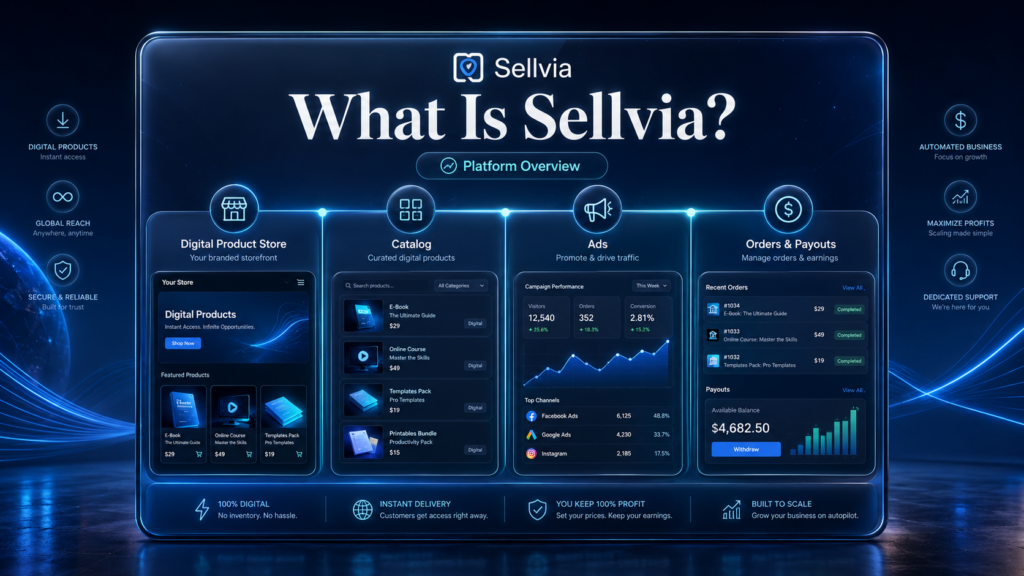
Quick answer: Sellvia is an ecommerce platform built around selling digital products through a ready-made store, product catalog, advertising workflow, order management, and payout tools. Users can select digital products, run advertising, process orders, monitor balances, and manage the business from one platform dashboard.
If you are researching Sellvia for the first time, the most useful starting point is understanding the system itself before looking at individual fees, reviews, or profitability calculations. Sellvia is designed to reduce the amount of technical setup required to launch a digital product business by bringing the storefront, product catalog, advertising workflow, orders, reporting, and payouts into one connected environment.
This guide explains what Sellvia is, how Sellvia works in practice, how to use the platform, what is included in the digital product catalog, and what a beginner should check before starting. More specialized topics such as pricing, cash flow, break-even analysis, and customer feedback are covered in separate Sellvia.biz guides linked throughout the article.
What Is Sellvia in Simple Terms?
Sellvia is an online business platform that provides users with access to a ready-made digital product store environment. Instead of building a store from scratch, creating a digital product catalog independently, connecting multiple business tools, and setting up an advertising workflow separately, Sellvia packages those components together inside one platform.
The core idea is straightforward: a user receives a functional digital product store, access to ready-to-sell digital products, built-in advertising tools, order management, reporting, balance tracking, and a payout area. These functions are connected through one dashboard rather than being spread across several unrelated services.
That makes Sellvia different from a generic website builder. The platform is not simply a tool for publishing product pages. It is a structured operating environment designed to take a user from store access to traffic, orders, processing, balance tracking, and eventually withdrawal.
Who Is Sellvia Designed For?
Sellvia is primarily structured for people who want a guided starting point instead of assembling an online business system piece by piece. The dashboard, onboarding flow, digital product model, advertising workflow, and support resources reduce some of the technical decisions a beginner would otherwise need to make independently.
The platform tends to be most relevant for:
- People who want to start an online business but do not want to build the technical stack from scratch.
- Users who prefer a structured platform over connecting multiple independent tools.
- Beginners who want access to ready-made digital product offers.
- People who want advertising, orders, balances, and reporting available from one dashboard.
- Users who are prepared to track business costs and performance instead of treating the platform as an automatic income system.
Worth noting: beginner-friendly does not mean passive. Users still need to manage advertising spend, understand the order-processing workflow, monitor cash flow, follow payout rules, and evaluate whether the numbers make sense for their own situation.
What Does Sellvia Include?

Digital Product Store
A ready-made store gives the user a working starting point instead of an empty site that still needs to be designed and configured before products can be tested.
Digital Product Catalog
Users receive access to digital offers such as guides, courses, templates, checklists, ebooks, video lessons, and similar digital content. The product side of the business is therefore much more structured than starting from zero.
Built-In Advertising
Sellvia includes an advertising workflow designed to bring traffic to the store without requiring a beginner to build every campaign manually from a separate advertising platform.
Dashboard and Reporting
The dashboard acts as the central control area for store activity. Users can monitor orders, advertising activity, balances, reporting data, and account settings in one place.
Order Management
When a customer buys, the order appears inside the account and needs to be processed according to the platform workflow. Processing cost should be considered separately from the amount paid by the customer.
Balances and Payouts
Earnings move through balance stages before becoming available for withdrawal. This is why order count and available cash are not the same thing, and why payout timing matters when planning working capital.
Sellvia Product Catalog
The Sellvia product catalog is one of the main components of the platform. It is built around digital products rather than requiring a new user to create every offer independently before the store can operate. Typical product types include guides, templates, checklists, ebooks, online courses, and video lessons.
For a beginner, this shortens the setup process considerably. Instead of spending weeks creating products before testing demand, the user can focus on choosing suitable offers, understanding the storefront, learning the dashboard, and evaluating how advertising and orders behave. The important business decision is therefore not simply whether products exist, but which products fit the store and the audience being targeted.
How Sellvia Is Different From Building Everything Yourself
One of the clearest ways to understand Sellvia is to compare it with building the same type of business independently.
A manual setup usually means choosing a website platform, preparing digital products, configuring checkout and payments, setting up advertising, creating an order-management process, connecting analytics, and deciding how financial reporting will work. Each of those steps can be handled independently, but each introduces additional setup time and technical decisions.
Sellvia compresses much of that setup into one environment. The store structure, product catalog, advertising workflow, orders, reporting, and payout tools are already connected. This can make the first operating steps considerably easier for someone without prior experience.
The trade-off is that the user works inside Sellvia’s platform rules and infrastructure rather than controlling every component independently. That is not inherently good or bad; it is simply the main structural difference between a managed platform and a fully self-built setup.
How Does Sellvia Work?
The basic Sellvia workflow can be understood as a sequence from platform access to payout:
- The user creates a Sellvia account and gets access to the platform.
- The user receives a ready-made digital product store environment.
- Digital products are selected from the Sellvia catalog.
- The user reviews the dashboard and advertising settings.
- Advertising or other traffic sources bring visitors to the store.
- A customer purchases a digital product.
- The order appears in the Sellvia dashboard.
- The user processes the order and covers the applicable processing cost.
- The related earnings move through the platform’s balance stages.
- Once funds become available and payout conditions are met, the user can request a withdrawal.

For a more detailed explanation of how earnings move between balance stages and toward withdrawal, see our Sellvia cash flow guide.
The important point is that a sale is only one step in the process. A useful financial view needs to include advertising spend, processing cost, the timing of incoming funds, and the amount that is actually available to withdraw.
How to Use Sellvia
For someone opening Sellvia for the first time, the platform is easier to understand when the first few tasks are handled in a clear order:
- Review the account and dashboard. Learn where orders, balances, advertising, reports, and account settings are located.
- Review the digital product catalog. Understand which offers are available and how they fit the store.
- Check the store setup. Review the storefront and how the selected digital products appear to customers.
- Understand the advertising budget. Know what spending level is being used before turning traffic on.
- Learn the order-processing flow. Know what happens after a customer buys and what cost is associated with processing an order.
- Watch balances and payouts. Distinguish between money connected to a sale and funds that are actually available for withdrawal.
- Review results regularly. Compare advertising spend, processing costs, order volume, and earnings rather than judging performance from order count alone.
This sequence gives a beginner a much clearer view of how Sellvia works as a business system. The goal is not to activate every feature immediately; it is to understand how the main pieces connect before increasing spending or adding optional upgrades.
What Sellvia Is Not
- Sellvia is not a guaranteed-profit system. It provides infrastructure and tools, but results still depend on costs, advertising performance, product selection, and management decisions.
- Sellvia is not just a website builder. The platform includes products, advertising, orders, reporting, balances, and payout functionality in addition to the storefront.
- Sellvia is not completely hands-off. Users still need to monitor orders, spending, balances, and account activity.
- Sellvia should not be evaluated only by its subscription price. Operating costs and cash-flow timing also matter.
- Sellvia is not the right fit for every user. People who want complete independent control over every part of the business may prefer a self-built setup.
The Sellvia Advertising System
Advertising is an important part of the Sellvia operating model because a ready-made store still needs visitors. The platform provides a built-in advertising workflow so a beginner does not have to start by learning and connecting a completely separate advertising stack.
From the user’s perspective, the central task is budget management: select the appropriate advertising level, monitor spending, compare it with orders and earnings, and avoid treating traffic as automatically profitable. Advertising can accelerate testing, but it remains an operating expense and should be evaluated against actual results.
The practical advantage is simplicity. A beginner can focus on the relationship between spend, orders, processing costs, and earnings without first becoming an expert in multiple advertising interfaces. The user still needs to make the financial decisions; the platform mainly reduces the technical complexity of execution.
Sellvia Pricing: The Basic Picture
Sellvia pricing should be viewed as more than a single subscription number. The base plan provides platform access, while the complete operating picture can also include advertising spend, order-related processing costs, and optional upgrades.
Because pricing is a separate search intent with its own variables and scenarios, this overview intentionally stays brief. For the full cost structure, see our Sellvia pricing guide.
If you want to model your own assumptions rather than rely on a generic example, use the Sellvia Profit Calculator. For a deeper explanation of the point where revenue and operating costs meet, see our Sellvia break-even analysis.
Growing and Eventually Selling a Sellvia Store
Sellvia can also be evaluated beyond the initial setup stage. Once a store is operating, users may choose to expand the catalog, improve the store presentation, add marketing tools, or make other upgrades based on the performance data they are seeing.
The platform also includes Sellvia Market, which creates an additional strategic possibility: building a store as an operating digital business and later offering it for sale once the applicable marketplace requirements are met. For some users, the goal may be ongoing monthly earnings; for others, the longer-term idea of developing a business asset may be relevant.
This does not change the fundamentals. Growth decisions should still be based on actual numbers rather than on the assumption that more products or more upgrades automatically improve performance. Revenue history, store quality, catalog fit, and financial consistency matter more than adding features for their own sake.
What Beginners Should Check Before Using Sellvia

Before starting, it is worth checking the main operating and financial rules that will affect the account:
- What the current subscription includes.
- Which features are optional paid upgrades.
- What advertising budget is realistic for the planned test.
- How order processing works and what costs are involved.
- How balances move before earnings become available.
- The current minimum withdrawal requirement and payout methods.
- Refund and cancellation rules.
- What support resources are available.
- How much working capital is needed for the first operating period.
- Whether the platform’s structured model fits the user’s goals.
These are normal due-diligence questions for any subscription-based business platform. Understanding them before increasing advertising or purchasing upgrades makes the financial side of the platform easier to manage.
If you also want to see feedback from users, visit our Sellvia customer reviews.
Final Thoughts
Sellvia is best understood as a structured digital business platform that combines a ready-made store, digital product catalog, advertising workflow, order management, reporting, balances, and payout functionality in one connected environment.
For beginners, the strongest advantage is not any single feature. It is the reduction in setup complexity. Instead of building the product, storefront, advertising, order, reporting, and payout systems independently, the user starts with those pieces already connected and can focus on learning how the business behaves.
The platform still requires active management and realistic financial planning. Users need to understand advertising costs, process orders correctly, watch cash flow, and evaluate performance using actual numbers. Approached that way, Sellvia provides a clear and practical framework for testing and operating a digital product business.
For more platform analysis, tools, pricing, and financial guides, visit Sellvia.biz.
Prices, features, platform rules, advertising terms, product availability, and payout details may change. Verify current information directly inside Sellvia before making financial or business decisions.
Prices and platform details are subject to change. Always verify current terms directly on the official Sellvia website before making any decisions.
54 responses to “Sellvia: What It Is and How It Works”
-
The Sellvia Market section is the piece most introductory articles skip entirely and it’s actually the detail that changed how I approached the first 60 days – treating the store as an asset you can eventually sell rather than just a monthly subscription changes every decision about what to invest in and when. Around day 47 I looked at the upgrade options differently once I understood they affected resale value, not just current performance. The build-and-sell cycle the article describes is a genuinely different mental model from just trying to make monthly income.
-
The advertising system section is the clearest explanation I’ve read of how the traffic infrastructure actually works – the marketplace model analogy clicked for me in a way the platform’s own onboarding never quite did. Week one I activated the Bronze package at $10/day and had my first order within 48 hours, which at the time felt lucky but in hindsight was just the system doing what it’s designed to do once you give it budget to work with.
-
The distinction between platform access and operating budget is exactly what I missed before starting – I had the $39 in my head as my full monthly commitment and didn’t build in the ad spend until day 3 when I realized nothing was happening without traffic. Once I treated the advertising as the actual engine and the subscription as the infrastructure cost, the math stopped feeling confusing and started feeling manageable.
-
The checklist at the end is the thing I needed before my trial ended, not after – specifically the payout minimums and withdrawal timeline section. Around day 19 I had commissions sitting in my balance that I couldn’t touch yet and didn’t understand why, and reading through the payout mechanics properly would have saved me three days of confused dashboard checking. The platform itself was fine, my understanding of how it worked was the problem.
-
The trade-off framing between structure and flexibility is the most honest version of this comparison I’ve seen – I came from trying to build everything myself and the setup friction alone was costing me weeks before I had anything live. At week 7 with this platform I was past that entirely and focused on actual numbers rather than configuration decisions. Less flexibility is a real trade-off but for someone whose alternative was not starting at all, the structure was the only path that actually worked.
-
the sellvia market section genuinely reframed how i think about my store. wasn’t planning to sell it but now i’m curious what mine would even be worth
-
good overview for anyone trying to figure out what sellvia actually is before diving into pricing pages and review sites. this is the clearest explanation i’ve seen
-
the distinction between “designed for beginners” and “runs itself” needs to be way more prominent in sellvia’s actual marketing. this article gets it right
-
activated ads day one after reading how the traffic system works here. first order came in day two. wasn’t expecting it that fast honestly
-
appreciate that this doesn’t oversell it. “not a guaranteed profit system” is a sentence i wish more sellvia review pages included upfront
-
[…] This article is not evaluating Sellvia as a supplier of physical goods or a fulfillment service. It is looking specifically at Sellvia as a digital product business platform, and at what it actually costs to run one. For a broader look at how the day-to-day mechanics work, see our guide on What Is Sellvia?. […]
-
The “what Sellvia is not” section is the most useful thing here. I almost signed up thinking it was a website builder. Understanding it’s a full operational system with catalog and ads included changed how I evaluated the $39.
-
Same. I came in thinking I was paying for a Wix alternative. The product catalog being included is what actually makes the math different. You’re not just getting a store shell.
-
Honest question though – if the catalog is Sellvia’s content, do you actually own anything? Feels like renting someone else’s products forever.
-
That’s a fair concern. The way I understood it – you’re running a store on their infrastructure similar to how Amazon sellers operate. You don’t own the products but you earn on every sale. Different model than building from scratch.
-
-
-
the build and sell model described here is the part that got me interested in the first place. monthly income is fine but the asset angle is what makes it different from just another store platform
-
took me embarrassingly long to realize the $39 subscription and the ad budget were two completely separate costs. this explains it better than the platform’s own onboarding did
-
the marketplace analogy for the ad system – comparing it to amazon or etsy seller advertising – finally made it click for me why the traffic works the way it does
-
solid intro. would’ve saved me some confusion in month one if i’d found this before signing up instead of after
-
the “what sellvia is not” section is doing more honest work than most of what you find when googling is sellvia legit
-
[…] What Is Sellvia? […]
-
Ok the Amazon analogy helps. I’d still want to know what happens to earnings if I cancel mid-month. Anyone know the actual answer?
-
Your available balance stays accessible after cancellation – I asked support directly before signing up. What disappears is the store itself after 7 days per their terms. So withdraw before you cancel, don’t leave money sitting there.
-
-
The build-and-sell section is what most Sellvia review articles skip entirely. I started month one thinking about monthly income. By month two I was thinking about what my store would be worth at month four. Completely different mindset and completely different decisions about what to invest in.
-
This shift in framing is underrated. Treating the store as an asset rather than a subscription service changes which upgrades make sense. A premium domain at $29 looks different if it affects resale value vs just looking professional.
-
Has anyone actually calculated what a 60-day store realistically sells for? I see the installment option mentioned everywhere but never actual sale prices.
-
-
60 day minimum before listing on sellvia market is good to know upfront. wasn’t aware of that timeline before reading this
-
My growth manager walked me through the factors – revenue history matters most, then catalog size, then domain quality. A store doing 15-20 sales/month for 60 days is in a different position than one doing 3. No specific number but the variables make sense.
-
The advertising system explanation here is the clearest I’ve seen. The Amazon/Etsy analogy is exactly right – you’re buying into a shared traffic infrastructure, not running your own campaigns. That distinction matters for how you evaluate the $10/day minimum.
-
I’d push back slightly on how clean that analogy is. Amazon sellers still control their listings, pricing strategy, and ad targeting. On Sellvia the platform handles all of that. More managed but also less control.
-
True. The trade-off is explicit – less control in exchange for less expertise required. For a complete beginner that trade is worth it. For someone with ad experience it might feel limiting. Depends entirely on where you’re starting from.
-
-
Fair enough. I have ad experience so the managed system feels constraining to me. But I can see why it’s valuable for someone who’s never touched Google Ads. Different tools for different users.
-
-
Reading this as a complete beginner – the “worth noting” callout that the platform doesn’t run itself is the thing I needed to read before I started my trial. I had a passive income mindset going in. Day 4 I realized that was wrong and adjusted.
-
How did you adjust? Genuinely asking because I’m at day 6 and still figuring out what “active engagement” actually means in practice.
-
For me it was logging in daily to check order dashboard, making sure processing happened within the 7-day window, and actually reading what the ad performance numbers meant. Not complicated but definitely not passive.
-
Add to that – talk to your growth manager proactively. Don’t wait for them to reach out. Mine gave me product selection advice on day 12 that changed my whole approach. Worth initiating that conversation early.123
-
The cost breakdown here matches my actual month one almost exactly. $39 subscription, $300 in ads at $10/day, plus processing fees on 11 orders. Total was around $360. Article’s math is honest.
-
Month two for me was $375 because I bumped to Silver tier at day 5. Still worth it but the automatic progression is the part I didn’t anticipate. Good to know before you hit it.
-
Wait the tier progression happens automatically? I’m at day 4 and didn’t know that. So at day 5 my daily ad spend jumps from $10 to $15 without me doing anything?
-
The ad budget packages unlock at specific days but I believe you still choose to upgrade. The Performance Tiers for order volume are the auto-upgrade ones. Someone correct me if I’m wrong – I may be mixing up the two systems.
-
-
-
-
-
I appreciate that this Sellvia review doesn’t pretend the platform is for everyone. The “who should be careful” framing without a matching list here is interesting though – the legit article has one but this one doesn’t. Would help complete beginners self-select before the trial.
-
clear writeup. the order management flow explanation matches exactly what i experienced setting mine up last month
-
I appreciate that this Sellvia review doesn’t pretend the platform is for everyone. The “who should be careful” framing without a matching list here is interesting though – the legit article has one but this one doesn’t. Would help complete beginners self-select before the trial.
-
Coming back after three months to say the framing in this article held up. Structured starting point, real operational workflow, real costs. I treated it like a business from week one and the math works. The people I’ve seen struggle treated it like a subscription service they could ignore. Same platform, completely different results.
-
the point about sellvia compressing five separate systems into one is accurate. tried building something similar myself on shopify first and gave up after two weeks of app research
-
appreciate the honesty that platform access isn’t the same as guaranteed results. too many sellvia reviews skip that part entirely
-
the premium upgrade section explains something my growth manager mentioned but never fully walked me through. good context
-
been on the platform four months, everything in this lines up with my actual experience so far. rare to find an overview this accurate
-
[…] advertising system to bring in visitors. For a deeper breakdown of the platform itself, see what Sellvia is and how it’s positioned in the […]
-
Really useful overview of Sellvia. I liked that the article explains the platform as more than just a store builder and clearly separates the subscription, advertising, order processing, and payout side. For anyone trying to understand how Sellvia actually works before signing up, this is a very clear and practical guide.
-
[…] returns to directly in a later section. For background on the platform’s stated purpose, what Sellvia is covers that separately, and how Sellvia works in practice goes deeper into the […]
-
[…] Sellvia dashboard can display $1,000 in Total Earnings, a positive profit figure beside processed orders […]
-
[…] Sellvia store can display orders and rising customer revenue while still sitting below break-even. That is […]
-
[…] Sellvia is best understood as a connected system rather than a simple website builder. Instead of assembling separate tools, a user gets access to several linked components in one place: […]



Erick Borth is an ecommerce writer and digital platform researcher at Sellvia.biz. He covers Sellvia’s business tools, subscription options, built-in advertising features, order processing, analytics, and financial workflows. Erick focuses on presenting platform information in a clear and practical way, helping beginners understand how Sellvia operates, identify the costs involved, evaluate its features, and make informed decisions about starting and managing an online business.
Leave a Reply